Yesterday I lost another day of my life due to my MacBook Air crashing, just four months after the last hiccup (
see Mavericks woes). Of course, the problem this time was subtly different to the previous time - the laptop 'died ' late on Monday night. I lost the mouse connection, and then everything else became unresponsive. It was too late to do anything so I switched it off and went to bed, blissfully ignorant of what was to follow the next day!
First thing yesterday morning I snuck into my office and switched on before going for a shower. Twenty minutes later and the gear wheel was still spinning. I rebooted and the same thing happened. So I started working through my check list of curative actions. Here we go....with notes about the action and outcome...
- Reboot in Safe Mode (Hold down the Shift key while powering up*) - nothing
- Reboot in Verbose Safe Mode (Hold down Shift and Command + V keys while powering up) - nothing
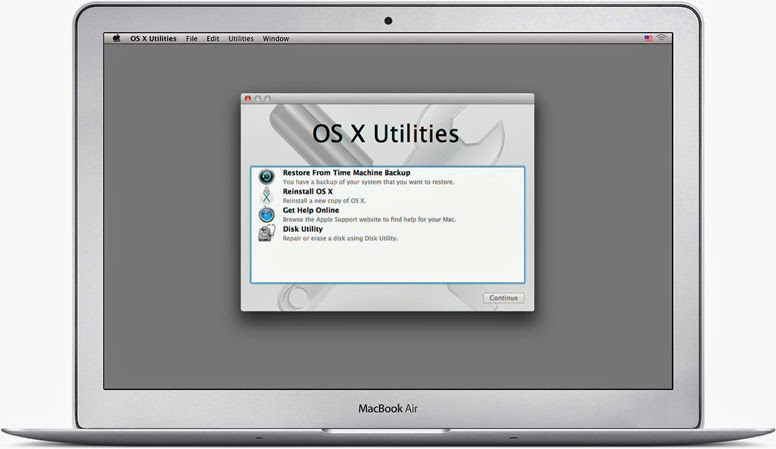
- Reboot into Recovery Mode (Hold down Command + R while powering up) - OK
- Run disk utility to repair disk - no problems reported
- Run disk utility to fix permissions - no problems reported
- Reinstall OS X - after 90 minutes the system failed to restart
- Repeat c) - after 2 hours the system reported an error
- Repeat c) - same result as c)
- Attempt to restore from Time Machine Backup - no Time Machine disk could be located
- PANIC
- Reboot in Single User Mode (Hold down Command + S while powering up) and run fcsk - no problems
- Reboot in Single User Mode and run Applejack - no problems
- Reboot and run Apple Hardware Test (Hold down D key while powering up) - standard and extended modes reported no problems
- PANIC more intensely
- Book Genius Bar Appointment (next slot in 48 hours time)
* For a full set of start-up options see this quick guide from Apple support.
Just for a moment, let's go back to step 6. Why couldn't the system find a Time Machine disk, especially given my
tight backup regime? There was a Time Machine disk visible to Disk Utility but it really didn't look very happy. My shiny new
4Tb Seagate Backup Plus disk, sitting in its new
Thunderbolt adapter was only showing one partition (there should be two) and that was only 500Gb (it should have been 2Tb).
Of course, whilst in panic mode, I'd forgotten that Seagate Backup Plus drives which are bigger than 2Gb need a special driver to work with the Thunderbolt adapter. In recovery mode, this driver wasn't getting loaded, and so the disk couldn't be recognised correctly. Hence the scary readings from Disk Utility.
To get round this, I had to replace the Thunderbolt adapter with the standard USB 3 adapter and try again. This time the backup drive was recognised and I could restore from the previous night's Time Machine backup.
Finally, the system rebooted although a load of settings had been screwed up. Some licences were missing, a number of configurations were screwed up - all in all, it didn't look much like the machine I crashed the night before. So the last task was to restore the CCC backup from the previous day, reboot one last time, keep fingers crossed and let out a big sigh of relief when everything booted up and looked like it was supposed to.
It just goes to show how important it is to have a rigorous backup strategy. If I'd had to go to the Genius bar it would have cost me another day, and the laptop could have been sent away for another week for a potentially expensive repair job (although luckily I still have 3 months left on my Apple Care warranty).
The only good thing that could have come out of a trip to Leicester Highcross Apple Store would have been to get an idea of the root cause - something I have not currently got, and probably won't ever have. But I think that would have been a long shot even for an Apple Genius.
One thing I do know. I'd much rather have to troubleshoot a Mac than a PC! At least Apple provide you with all the tools to help yourself - if you follow the advice from folks in the Apple community... and continue to read the Apple Harvest blog!
Happy Easter!




 Posts
Posts


