Showing posts with label Mobile Internet. Show all posts

Sunday, 22 August 2010

Get Your Own Space - Zoom 3G Wireless Travel Router

I've been using PDAs and Smartphones for longer than I care to remember. Since trading in my Filofax in the early 1990s my life has existed in Cyberspace on a Psion 3, Psion Series 5, HP Journada, various Orange Smartphones and over the last two years on my iPhone 3G and now my iPhone 4. All these gadgets have had connections to laptops and desktops, initially Windows, but now everything exists in Apple Space.

The better these toys get, the more I find I'm reliant on them - from keeping track of expenses, looking up passwords, linking back to my Pogoplug and its disks back at home, to route finding, on-line timetables, and of course social networking and mail - I can do nearly everything I need to do on my iPhone and link it back to my iMac or MBP when back at base, wherever that may be.

Which means that there are times when I'm completely and utterly screwed - especially when I'm abroad. The old O2 unlimited data plan may have been replaced by a more restrictive 500Mb allowance, but this is simply luxurious when you are abroad, with prohibitive roaming charges and exorbitant wireless fees for anything more than very casual access. And without liberal access to data, the iPhone (or any other Smartphone for that matter) becomes little more than any other phone on the market, except it's much more painful having all those apps at your fingertips that you can't or daren't use.

What you need is a personal WiFi space around you which provides you with a mobile lifeline to Cyberspace. In the UK 3 have led the way with their MiFi device which is a 3G device that generates a WiFi hotspot from the 3G signal. But this is locked to 3, and as soon as you step out of the UK you get hit by those evil roaming charges once again. launch2net (see the review from earlier this year) allows you to generate a WiFi hotspot but it means dragging a laptop around with you which is not a particularly mobile solution - it's a bit of a throwback to the days when mobile phones came with batteries the size and weight of a car battery.

There is an alternative to the 3 MiFi solution which costs a similar amount but does the same job without tying you to a specific network. Enter - stage right - the Zoom 3G Wireless Travel Router.
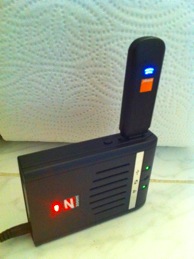
Zoom 3G Wireless Travel Router

The Zoom device allows you to plug in (almost) any 3G USB stick and will then generate a WiFi hotspot from the 3G signal. I've had mine for about a fortnight and it's had a huge impact on my life here in Zurich. I can use the translation programme while I'm in the supermarket (my German is non-existent). I can do currency conversions using the latest Forex data rather than week old rates. I can get train and tram times before I leave the office so that I don't have to hang around the tram stops in the rain. I can see Twitter at work (a social networking free environment) and get my mail without having to fire up the laptop.

The Zoom 3G Wireless Router is not as elegant (pretty) as the 3 MiFi, but it is downright functional. The box is about 4 x 3in and an inch thick. It weighs just under 5 oz with the battery. The photo below shows a size comparison to the 3G iPhone. The unit is supplied with a rechargeable battery which lasts about 3 hours in a single go, and takes a couple of hours to recharge from the power adaptor (also supplied). The router can run from the mains if required. LEDs on the top panel show power/charge status, USB connection, Wireless on, and Ethernet connection. An on/off switch is located at the rear of the unit, alongside an Ethernet port. As shown above the 3G dongle fits into the USB socket on one side of the box. While this looks a bit ungainly, the connection is good, and I've never had the dongle fall out, despite having the unit sitting in a rucksack pocket and in my trouser pocket.

IMG_0264.JPG

Router configuration is very simple. It's easiest to connect the unit to your computer via the ethernet cable, plug in the dongle, power up and then set your browser to point to http://192.168.1.1 which will load up the configuration page for the device. A Wizard is available to quickly get you up and running, and allows you to modify the configuration manager password, choose a security method for protecting your WiFi hotspot and assigning a password if necessary, and finally for setting up the dongle/ISP settings - APN, username and password, and PIN. Some of these will be provided with your dongle, others are easily available from the internet. You will have to go through this configuration every time you change the dongle. If you use the same dongle all the time the device retains the settings.

There a numerous other configuration options available through the configuration page advanced settings but I've not really investigated these. Everything I need can be achieved through the wizard. I regularly change 3G dongles and configuration literally takes 30 seconds between changes. For those of you concerned about security (which should be all of you!), the router can handle WEP, WPA and WPA2 protocols. And while on the subject of protocols, the router supports 802.11n/g and b wireless capabilities.

The Zoom travel router has proved to be one of my best buys of the last few years. Inevitably there are going to be places where it won't work because no 3G signal is available. I very much doubt I'll be able to use it on most of the train journey between the East Midlands and London on which none of my connections seem to work for very long, but when you are out of range of a wireless hotspot in town there shouldn't be any problems. It really comes into its own as soon as you go abroad, especially for iPhones, iPads and other smart gadgets which need live data to truly make them smart. Zoom also produce a 3G dongle which is not locked - so with the pair of gadgets, all you need to do when you go to a new country is buy a PAYG SIM card and you should be up and running in no time.

Highly recommended!!!
.

Sunday, 11 July 2010

launch2net premium - Mobile Internet made Easier

I've been using Mobile internet devices ever since they first became available but since moving onto the OS X and Apple platform I've have always found that the software provided leaves a lot to be desired. Windows users have always been fairly well catered for, but Mac users seem to have considered as second class citizens. I've always been able to get USB Modems and Dongles to work, but it's always been a fiddle, rather than a simple one click and it's done operation.

Most recently in the UK, I was using an offering from Vodafone, which made me get an initial connection using their rather substandard software, and then physically connect through the Network preferences or modem icon in the menu. If I wanted to monitor my usage (3Gb/month) I also had to run some 3rd party software. In my case I elected to use SurplusMeter by SkoobySoft.

However about a year ago, I chanced upon a piece of software that looked like it could make Mobile Internet on the Mac a much simpler experience. I think it may have been a promotion on MacPromo but I can't really remember anymore. I downloaded the trial and within a few minutes paid for a licence. The software in question was launch2net and it was a one stop click to connect and I think it included monitoring, but I can't honestly remember as I now use its grown up big brother launch2net Premium.

launch2net (I'll drop the premium suffix for the rest of this piece) is a stand-alone application that supports numerous mobile modem devices. It pretty much configures itself when a new device is plugged in, works out the appropriate settings, locates a suitable internet signal 3G, 2G, GPRS or EDGE, and waits for you to confirm the connection. Once you connect it then monitors your usage and signal strength, and when you are finished you simply disconnect by clicking on the appropriate button. Simple, huh?


launch2net.jpg

It doesn't end there, however. The premium version also allows you to generate a wifi signal from your connection (with security) by setting up an internet sharing capability. This is a killer feature and is worth the cost of the licence for me. I'm currently living and working in Switzerland. Because I'm only here for a short contract, I can't get fixed line broadband so I need PAYG mobile internet. My flat is also out of reach of a commercial wireless network which makes my iPhones look a bit miserable.

With my Orange CH 3G dongle and launch2net I'm able to pick up a pretty good 3G signal and generate a 40-bit WEP encrypted WiFi signal which gets my both my iPhone 4 and 3G connected to the network. (I have two phones because one has a local Swiss SIM card in, and the other is my normal UK phone). To be fair to Orange, they have actually provided a pretty good connection application for the Mac, and it's a little bit quicker to use than launch2net, but then again it is dedicated to the Orange network and configured accordingly. It can't however generate the WiFi signal that keeps my phones on-line. launch2net can alternatively use 128-bit WEP encryption, but I'm not too bothered about that - I'm not on-line for long periods and there's not much confidential stuff going across the network anyhow.

launch2net isn't without its problems. I did have to configure the settings for the Swiss Orange network but the information was easily located by running a Google search. The 3G dongle modem supplied isn't listed as being supported by launch2net but it worked without any problems. For the technically curious it's a Huawei E1552 - 900/2100 HSDPA/UMTS, 4-band EDGE/GPRS/GSM with upto 3.6Mbps download speed.

The other functionality built into launch2net is an SMS messaging centre, which pretty much does what it says, and allows you to send, receive and manage SMS messages across the internet. There are also quite a number of configuration settings allowing you to choose between monitoring home or roaming sessions, and other interesting things. Of course, it's also possible to set up custom settings for networks as I had to for Orange CH.

Before leaving the UK I tried the software (I have a second licence) in my Hackintosh but I wasn't able to get it to work. Although the software runs in demo/trial mode, I cannot get it to activate with the licence information. The Novamedia technical support folk were very helpful but could not resolve the issue. This is a real shame, but it's one of the risks you take when using a Hackintosh - it's even more frustrating given that's thing that fails is not actually part of the real function of the software. I wish there was a file that they could send me to bypass the physical activation process and allow me to register my license but at the moment they've not provided me with that option. It's also disappointing because there were no problems at all with the previous version.

All in all, I'm really impressed with launch2net. I love its simplicity - it does all the technical stuff behind the scenes and simply allows me to do what I want to do - namely connect and go. The WiFi bonus is awesome - I can't over emphasise that - and it's great not having to remember to switch on a secondary monitoring programme. Novamedia strongly recommend that you try out the software before purchase to ensure it works with your hardware, which seems like pretty good advice.

Oh, and before you ask - yes it does work with Snow Leopard 10.6.4!
.
