Showing posts with label iPad Docks. Show all posts

Sunday, 22 June 2014

Fruity Picks #5 - Multi-device Docking Station

I seem to write a lot of posts about device docks - and here’s another. Individual docks for iPhones and iPads are all well and good, but each one needs a cable and power source, and often docks are device specific. Sometimes you need something a bit more flexible and I believe I’ve now found my preferred solution (at least for now!), even though it doesn’t have a name or a manufacturer! So I’ll call it the MdDS (Multi-device Docking Station), from an unknown Chinese maker.

The MdDS is not designed as a portable device dock, but it is light enough to  put in a bag and not break your clavicle. It does take up a bit of room, but then it is designed to charge two devices simultaneously - and it has a speaker built in. Not bad for £33 (including P&P). But it gets better.

The MdDS uses a modular connection system allowing you to plug in different connectors for different devices. It comes with a straight lightning connector, an iPhone 5 connector with 3.5mm audio jack, a pair of older 30pin dock connectors and a micro USB connector for good measure. The unit feels sturdy and of decent quality, although the plug-in connectors are little bit lightweight. There are a couple of detachable tabs which lend a modicum of support to larger devices.

The MdDS comes with a proprietary USB cable with a connection to a DC 5V 2.5A socket on the device. Unfortunately I mislaid mine on the first week of my travels and could not find a replacement on-line. However, we took a trip to Maplin, taking the device with us, and the guys there let me try out a switchable mains adaptor with a variety of connections, and we found one that worked* (although it cost £20.00!). I've since relocated the USB lead, but they are clearly difficult to come by. So be warned! I'm using a standard Apple 10W iPad charger to power the unit - you need to provide this or something similar yourself.

MdDS with iPad Mini and iPhone 5 Charging

I use the Logitech Mini Boombox as my portable bluetooth speaker of choice so I’m not too fussed over the MdDS speaker which has a pair of 3W units inside. These produce a reasonably clean sound, weak on bass, but good enough if you have nothing else handy. You can toggle the input source using a switch on the top of the unit, or you can turn the speaker off completely.

Regardless of whether I’m at home or away, I want to be able to charge my iPad mini and iPhone overnight. This allows me to do exactly that - and only use a single power socket. I’ve bought two of them so I have a home and away solution.

* Switched Mode AC DC Adaptor for General Use (L06BR)


Friday, 15 February 2013

A Lightning Review of Lightning Docks

In my last post before Christmas I mentioned all the goodies I added to the Apple Harvest inventory over the past 6 months, and I promised to write about some of them but it's really hard to know where to start. The new iMac 27inch is purring away upstairs in the office (I'm writing this on the MacBook Air while watching the tele with one eye!) but that started as a horror story so I'll save that for another day. So I'm going to start with something a bit less exotic, but nevertheless essential in a busy office environment - namely docks…

Both the iPad mini and the iPhone 5 sport the new Apple Lightning connector. A lot of people have been very angry about Apple's decision to dump the old 30pin connector that has been around for the last 5 or so years since the introduction of the 3rd generation iPod. Whilst I have a number of accessories that do use the 30pin dock as standard I'm not going to lose any sleep over the change. Now I have a mixture of iOS devices that use Lightning and 30pin connections I bought a few (Apple and 3rd party) adaptors that get me through the day. And on the positive side, I like the fact that the Lightning connector is 'reversible' meaning it doesn't matter which way round you attach it to the device.

The downside has been that manufacturers seem to have been really slow on the uptake to provide Lightning specific accessories - at least, ones that are available in the UK. I particularly wanted Lightning docks for charging and potentially syncing both the iPad Mini and iPhone 5.  Syncing is less of an issue these days with iOS offering wireless syncing. I absolutely didn't want docks that weren't oriented to both devices, and I didn't want to have to be constantly taking off cases and putting them back on again. Happily I've found two excellent docks meeting my specifications. The first is from Belkin and the second from Sinjimoru. Both docks are striking in their design as you can see from the photos below.

Belkin Lightning Dock
        Sinjimoru Lighning Dock


The Sinjimoru dock can be configured for either the old 30 pin connector or Lightning but offers no other features. The Bekin is purely a Lightning dock but also has an AUX port at the back and connect to the headphone socket of the iPhone 5 via an ingenious fold down jack plug. It's because the plug can be folded into the stand that enables it to double up as an iPad mini dock. Check out the video to see this in action. Both docks can handle cases on the devices, although it can be a bit of a tight squeeze with the Sinjimoru.

The Belkin comes in at £24.99 (it's much more expensive on Amazon - £37.90!) while the Sinjimoru is a little cheaper at £19.95 and is available in black or white. On the Belkin UK site it says that the dock is currently available for pre-order but in fact it shipped the same day I put the order in. It is available from other UK distributors if there are problems sourcing it directly.

Ultimately the Belkin is probably the more flexible device given the additional features and its slightly better ability to handle an iPad mini in a case, but only if you need this and can get the dock at the right price. The Apple Harvest homestead is configured with Sinjimoru docks in the bedroom and office whilst the Belkin lives downstairs in the living room.

There, at last. First post of 2013 completed and posted. See you next time!


Saturday, 18 June 2011

Protect Your Assets - 3 Cases for the original iPad

There's no question that the iPad is a beautiful piece of kit and it is surprisingly robust. But if you're like me and carry the iPad around with you, out and about, on a daily basis you really need something to protect it from the rigours of travel and general knocks and bumps. I've tried a selection of cases and stands over the past year, but I think I've finally got the right solution. In this post, I'll put the original Apple case, Joby Ori and inCase Origami Stand Sleeve head to head.

I bought the original iPad Apple case when I first picked up my iPad. I've always tried to protect my gadgets and I wasn't prepared to risk my new investment on the flight back from Boston to the UK, and the subsequent return trip to Switzerland. The Apple case also doubles up as a stand but it falls a bit short in both case and stand departments. It doesn't provide much in the way of protection other than keeping the front and back of the device safe from picking up scratches, but that's probably true of most cases. As a stand it works well as a prop to support the iPad in landscape mode, but you need a fairly flat surface to guarantee its stability in its portrait orientation. It is fairly thin, which is a plus point for a number of docking devices and stands (I bought the Compass stand at the same time). It doesn't add a huge amount of weight to the device which is also a good thing when holding the device for any length of time, and I like the idea of the book metaphor. Having a case that opens like a book cover does help me think I'm reading a book rather than looking at a tablet. The biggest negative for me is the battle getting the iPad out of the case once it's in place. Getting it in is OK, but it's really tough getting it back out again.

The Joby Ori is a much bigger and sturdier beast altogether. Again it acts as both stand and case but is much more flexible than the Apple case. The name derives from origami (Japanese art of paper folding) and the Ori's primary selling point is the variety of stand configurations it can assume. The Ori adds a certain amount of bulk and weight to the iPad, but the super-strong composite material used certainly gives one the confidence that it can take quite a beating before the reaching the precious contents. I managed to use the Ori with my iHome iA100 docking station but I expect the extra depth that comes from the case will prevent a suitable marriage with other devices. The Ori suffers from the same problem as the Apple case in that it's the devil's own job to get the iPad out once it's in place. And quite frankly, the Ori is not well suited to holding the iPad for extended periods - it's just too heavy and thick. Flexibility and strength also come at cost however, and the Ori is not a solution for those on a tight budget. I paid £80 for mine and then got a hefty C&E import bill to boot. I notice now however that the price on the website is down to £60.

My most recent purchase is the inCase Origami Stand Sleeve, another dual purpose case. Everything you need to know is in the name - it's primarily a sleeve with good all round padding and a faux fur interior to protect the iPad in transit. The tablet is fairly easily removed and replaced, and is then available to be used as is - showing off the beautiful design and fitting into all the gadgets designed around it. I say fairly easy to remove and replace because the sleeve top is quite tight, especially when you first use it, but it does loosen up after a while and becomes much easier to use. The clever part of the design is that the sleeve folds back on itself when empty, and an elastic loop and plastic hook mechanism allows the sleeve to be used as a stand in either portrait or landscape. Whilst not as robust as the Joby it provides a firm enough support to type on in landscape mode and a comfortable enough angle to watch in portrait mode.


inCase Origami Stand Sleeve
iPad 1 in the inCase Origami Stand Sleeve

Of the three designs, I suspect only the inCase sleeve will support both the original iPad and the iPad 2, although clearly the iPad 2 was designed with additional smart case capability. I tend to use the inCase sleeve as my primary case as it is the most versatile and comfortable, and I really prefer using the iPad without any casing when I'm at base. The Joby Ori is my case of choice when travelling on longer journeys, and it really comes into its own when your iPad is your only source of entertainment, especially when watching movies or TV. I passed on the Apple case to a friend who has recently acquired an iPad as it had become surplus to requirements, but it served me well for the first six months, and I think some of the harsh criticism I have read is unjustified.

If you are thinking of buying a case you need to consider a number of things.
  • Do you want to use the iPad with or without a case when not on the move ? - Get a case that's easily removable
  • Do you want to dock the iPad on a regular basis ? - Make sure the iPad and case will fit
  • Do you want a stand facility ? - there are plenty of cheap sleeves out there if this is not a requirement

As an afterthought to this post, I recently bought the inCaseOrigami Workstation for the Apple Wireless keyboard. This is a tasty little case for the keyboard but also allows you to prop up an iPad and use them together as shown below. This combo, with the inCase sleeve for the iPad is the ideal combination for the road warrior.

inCase Origami
iPad 1 in the inCase Origami Workstation


Tuesday, 1 February 2011

Two New Toys - a sneak preview

I've been a bit under the weather for the past week or so - it's virus season in the UK (that's the kind that attacks people, not Apples) and it was just a matter of time before it caught up with me. But two new toys arrived at Apple Harvest HQ this morning which cheered me up no end. The first was a blooming great big box which turned out to be my long awaited iPad dock. The second was the new wireless charger for the Magic Mouse.

This is just going to be a sneak preview as they are so new and still need to be put through their paces. Watch out for more in-depth reviews in future posts.

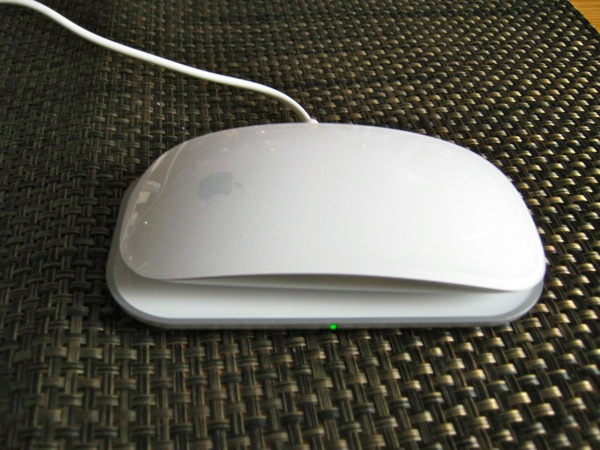
Mobee Magic Charger

I'll start with the charger because it is so simple to get up and running. The Magic Charger consists of an inductive charging pad, a replacement battery pack and a mini USB cable. Installation is simply a matter of taking the back off the Magic Mouse, removing the batteries and replacing them with the battery pack. With the USB cable plugged into the charging pad and an appropriate USB power source (USB port on a Mac or an external charging unit both work fine) all that is left to do is to put the mouse on the pad and watch the little green light start to flash.

That's all folks!

Mobee Magic Charger
Mobee Magic Charger

This is a really neat piece of gadgetry, which Mobee claim will pay for itself within six months of office use or a year in the home. I can't be bothered to do the sums but that sounds fine to me. What I really like is the fact that I don't have to worry about running out of mouse batteries again - well at least not Magic Mouse batteries. Of course, you are potentially losing a precious USB port while charging is taking place, but ideally you can charge overnight and during breaks when the USB port is less valuable. I have a Mophie Juice Pack Powerstation which I can use as an external charger if necessary.

It took about an hour to get the Magic Mouse charged to a state where it claimed to be at 50%. I've seen claims that the % charge never rises above 78% but as I was writing this I checked and it was now at 82%, but I'm not convinced about the accuracy of Apple's battery life algorithms any more. I'll be watching these numbers over the next few days and report back in a later post. Similarly the manufacturer claims 6 days autonomy after a full charge, but the Macworld review suggests a day is more realistic. Again, I'll monitor and give you my findings in a week or so.

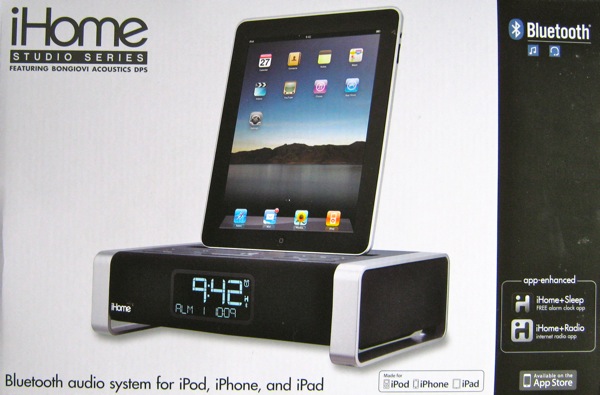
iHome iA100 Bluetooth Audio System

I've used an iHome audio dock for a while (see my review of the iHome Reson8 from October 2009), and have been really pleased with. But of course, it doesn't work with the iPad, and companies appear to have been very slow to fill this apparent gap in the market. iHome announced their iPad offering back in July 2010, and it started appearing in October. I ordered mine back in October and it finally arrived this morning. And it's been well worth the wait.
The unit is much smaller than I expected, but is beautifully engineered and looks fantastic. It sounds really good too. And critically for me - you don't have to take the iPad out of its case. The iA100 is an app-enhanced device and can be set up to work in conjunction with the iHome+Sleep app which is free from the App Store.

That's all I'm going to say for now - the alarms are set up for the next few days and if they work as I expect, I'll start writing the proper review tomorrow!

iHome iA100 Bluetooth Audio System
iHome iA100 Bluetooth Audio System (in the box)