Almost immediately after posting my last article, iTunes stopped sending AirPlay signals to my Airport Express device. I felt a bit like the Apple ecosystem had become a petty minded sentient being who was taking the mickey. Once again I went through each and every one of the possible fixes I have accumulated over the past few weeks but to no avail. Nothing I tried seemed to work.
But then a bit of serendipity took place. I recently downloaded a small menu bar utility called Output (available from the Mac App Store - 69p) which simply allows you to easily select input/output devices from a drop down list of available devices. I regularly swap output devices so this is a godsend saving the hassle of having to either go into the System Preferences or remember to hit the Alt button when selecting the volume icon.
Output showed the Airport Express as one of the available output devices and when I selected it, lo and behold, iTunes played out through the stereo system downstairs. It's not true Airplay since you can only select a single output device at a time, but it demonstrated that my system was actually OK and that it was most likely an iTunes issue.
Once I'd established that the problem appeared to be an iTunes bug, it meant I could stop spending (wasting?) hours trying to fix it if it recurred. As if by magic, shortly after that, the problem resolved itself, and then later in May a new minor version of iTunes appeared (11.0.3) and I've not seen the problem since.
Has iTunes been fixed? No clues from Apple in that respect in the release notes. Which is another reason for disliking some of Apple's reluctance to be more open about its software. We never get to see whether bugs have been addressed (and potentially fixed for eternity), or whether they've just disappeared for a while but may reappear in the future. As a former developer, I've always tried to be open about known bugs which have been fixed, whilst trying to be clear that sometimes the little beggars will show up again. This helps prevent people from suing you, and it's a stance I wish more big companies would take - including Apple!
Showing posts with label Service Excellence. Show all posts
Showing posts with label Service Excellence. Show all posts
Sunday, 2 June 2013


Saturday, 11 May 2013
Silence Is Not Golden
Most people who know me understand that I am something of an Apple geek. The Apple Harvest ecosystem is almost entirely Apple based. The bits that aren't are mainly there because Apple doesn't make them, or because of necessities like work (yup I have to use a horrible old Lenovo Thinkpad for my current contract). I do most of my own work on the new 27" 2.9GHz i5 iMac with 24Gb of RAM and the 3Tb Fusion disk. Outside base I use a combination of my 2 year old 13" MacBook Air and a 3rd generation iPad, my iPad Mini and of course an iPhone 5. The network is glued together from a Virgin Superhub in modem mode, with the wireless network driven from a 3Tb Time Capsule, and extended across the house through an Airport Extreme. There are a couple of Apple TVs and a new style Airport Express box completes the multimedia set-up with an AirPlay™ link to my stereo system.
99% of the time I consider myself to be a very happy bunny. My cable based broadband connection is rated at 100Mbps (soon to be upgraded to 120Mbps) and by using the 5GHz wireless channels I can get wireless transfer rates of unto 40Mbps. And for 99% of the time everything works as I expect it to.
The remaining 1% of the time I'm unhappy because of the silly little things that occasionally go wrong and divert me from what I want to be doing to what I have to do to fix them. Because that's one of my problems - I can't live with a system that isn't working the way it's supposed to! I'm a little tinkerer!
My most recent bugbear has been with Apple's AirPlay™ system. Ever since I bought my first Airport Express I've been using AirPlay to hook into my stereo system which lives downstairs from the main Apple Harvest office. Over a multitude of system configurations it has worked faultlessly. Until just recently when the iMac refused to connect to the Airport Express. The MBA could connect, as could all the iOS devices, and everything could connect with the Philips Fidelio AirPlay speaker in my bedroom. And everything connected OK with the Apple TVs in the house. So AirPlay itself didn't seem to be the problem.
There are hundreds of similar problems mentioned in the Apple support forums, but not many are fully resolved. I spent a couple of hours rebooting different parts of the system with no success before trying that catchall of solutions - repair disk permissions - which of course worked…! For a few days…
A week later the same problem manifested itself so naturally my first inclination was to repeat the previously successful process. Nada. Rebooted all the systems. Nada. Scratched head and returned to Apple support forums. A few folk appear to have resolved the problem by turning off IPv6 protocol settings but these were already switched off. So, unaware that I had made any system changes, I gave up trying to fix the problem and went for a beer having wasted most of the morning. Later that afternoon I had to do a reboot on the iMac, and for some reason decided to see if AirPlay would connect this time. Of course it did, and has now continued to work as expected for ten days during which time there have been several more reboots to one or more parts to the system.
And I still have no understanding of the root cause or how to fix the problem again in the future.
My second big problem recently has been with the 3rd generation iPad. I bought this last July and it has been a stellar performer, far exceeding the original iPad which I still consider to have been the greatest disruptive technology to have hit the consumer computing industry in my lifetime. However, after upgrading to iOS 6.1.2 I had nothing but problems. These included:
But once again, I have no explanation as to what happened or why. Whether it was a corrupt iOS 6.1.2 installation or not, I shall never know. I'm just grateful to have my favourite toy back up and running!
Ultimately, the whole point of this post is that while Apple kit and software generally works brilliantly, it's the occasional time when it doesn't that drives us crazy - because it's gone outside the normal parameters of tolerance that we have become so used to. We don't (well I don't) expect Wintel systems to last a day without some grief so this becomes the norm. We expect Apple systems to last for weeks or months on end, and even if they don't, there are usually relatively trivial fixes that are easy apply.
It's said that Apple don't monitor the support forums, but I would like to think that one day they may at least put triggers in place so that when a discussion hits a certain number of pages that someone in the company would look into the problem and do something about it, or at the very least acknowledge the problem. Even the most loyal Apple supporter wants to know that someone in the corporation has one ear open to the occasional plight of the customer, and in this area of customer service, silence is not golden.
99% of the time I consider myself to be a very happy bunny. My cable based broadband connection is rated at 100Mbps (soon to be upgraded to 120Mbps) and by using the 5GHz wireless channels I can get wireless transfer rates of unto 40Mbps. And for 99% of the time everything works as I expect it to.
The remaining 1% of the time I'm unhappy because of the silly little things that occasionally go wrong and divert me from what I want to be doing to what I have to do to fix them. Because that's one of my problems - I can't live with a system that isn't working the way it's supposed to! I'm a little tinkerer!
My most recent bugbear has been with Apple's AirPlay™ system. Ever since I bought my first Airport Express I've been using AirPlay to hook into my stereo system which lives downstairs from the main Apple Harvest office. Over a multitude of system configurations it has worked faultlessly. Until just recently when the iMac refused to connect to the Airport Express. The MBA could connect, as could all the iOS devices, and everything could connect with the Philips Fidelio AirPlay speaker in my bedroom. And everything connected OK with the Apple TVs in the house. So AirPlay itself didn't seem to be the problem.
There are hundreds of similar problems mentioned in the Apple support forums, but not many are fully resolved. I spent a couple of hours rebooting different parts of the system with no success before trying that catchall of solutions - repair disk permissions - which of course worked…! For a few days…
A week later the same problem manifested itself so naturally my first inclination was to repeat the previously successful process. Nada. Rebooted all the systems. Nada. Scratched head and returned to Apple support forums. A few folk appear to have resolved the problem by turning off IPv6 protocol settings but these were already switched off. So, unaware that I had made any system changes, I gave up trying to fix the problem and went for a beer having wasted most of the morning. Later that afternoon I had to do a reboot on the iMac, and for some reason decided to see if AirPlay would connect this time. Of course it did, and has now continued to work as expected for ten days during which time there have been several more reboots to one or more parts to the system.
And I still have no understanding of the root cause or how to fix the problem again in the future.
My second big problem recently has been with the 3rd generation iPad. I bought this last July and it has been a stellar performer, far exceeding the original iPad which I still consider to have been the greatest disruptive technology to have hit the consumer computing industry in my lifetime. However, after upgrading to iOS 6.1.2 I had nothing but problems. These included:
- iPad went into recovery mode. Then took 5 attempts to recovery from a previous backup - repeatedly returning to recovery mode during restore
- When connected to iMac it often only displayed the "Welcome to Your New iPad" screen
- Random video glitches usually resulting in reboot
- Video glitches in folders
- Intermittent app updates - sometimes waiting for 24 hours or longer. Almost always required reboot
- Could not install iOS 6..1.3 - error downloading
- Last restore from backup took 3 days to complete
- Generating much more heat than before (on both battery/mains)
- Random reboots when launching apps
- Random reboots using apps
- Sometimes took 4+ attempts to launch apps - usually requires reboot
- 8 apps went into update mode (waiting) - could not remove them, even by removal and reinstall from iTunes
- Restarts about 10 times each day
But once again, I have no explanation as to what happened or why. Whether it was a corrupt iOS 6.1.2 installation or not, I shall never know. I'm just grateful to have my favourite toy back up and running!
Ultimately, the whole point of this post is that while Apple kit and software generally works brilliantly, it's the occasional time when it doesn't that drives us crazy - because it's gone outside the normal parameters of tolerance that we have become so used to. We don't (well I don't) expect Wintel systems to last a day without some grief so this becomes the norm. We expect Apple systems to last for weeks or months on end, and even if they don't, there are usually relatively trivial fixes that are easy apply.
It's said that Apple don't monitor the support forums, but I would like to think that one day they may at least put triggers in place so that when a discussion hits a certain number of pages that someone in the company would look into the problem and do something about it, or at the very least acknowledge the problem. Even the most loyal Apple supporter wants to know that someone in the corporation has one ear open to the occasional plight of the customer, and in this area of customer service, silence is not golden.
Saturday, 20 November 2010
Thumbs up for Apple iTunes Customer Support!
Apple’s customer service sometimes seems like a two-headed monster. When it’s bad, it’s very bad but when it’s good, it’s about as good as it can get. I have only had the need to contact them on one occasion, which was about a week ago. I had downloaded some TV programmes from the iTunes store as my limited access to Swiss TV was becoming overloaded by Champions League football and a marked drop in the number of programmes being shown with an English soundtrack option.
In particular I’d earmarked The Red Riding trilogy shown earlier this year in the UK, which had good reviews and had captured my imagination. When I was back at home a couple of weekends ago I took the opportunity to download the 3Gb of programming, along with some other goodies, and was looking forward to watching the trilogy over a few nights the following week.
On my return to Zurich, I noticed that iTunes was showing duplicates of each of the episodes and given my lack of hard disk spaces I did a clean up. When I then came to watch the shows I got an error telling me that the originals were no longer available. And because my iTunes library already weighs in at 70Gb, I had excluded it from my Time Machine backups.
So no Red Riding…
I contacted Apple Support and detailed the problem in an email. Within a couple of days I received a reply from Arran asking confirming his understanding of the problem and asking me for the order details. I was a little busy at the time, and didn’t get round to replying immediately, but 24 hours later I got a second mail repeating the request. This time I managed to send a reply, and within a few hours the shows were made available to me again at no charge.
With limited bandwidth, there was no way that I could download the material while still in Zurich, so I wrote back asking if there was any time limit for downloading the replacements, and indicating that I would be able to perform the download within a fortnight. Again I received a reply within an hour or so, confirming that this was not a problem, and that the shows would be available for download for as long as required.
Last weekend I finally got the material back onto the laptop and I’m looking forward to finally getting round to watching the series. I hope it’s going to be worth all the effort!
Update:
Between writing this entry and actually publishing it, I’ve had a second opportunity to put the iTunes support guys to the test, and once again they’ve come up trumps. I downloaded the Sgt.Pepper’s Lonely Hearts Club Band album by The Beatles on my iPad to mark the occasion of The Beatles music finally being available for download. Everything seemed to work OK but when I later linked the iPad to the MBP only the video was there – all the songs were missing. This time I contacted support via the Report a Problem in iTunes, but the outcome was very similar. Some mails acknowledging the problem and confirming the issue and a day later a mail explaining that the missing material was available for me to re-download at no extra cost. Thanks to Daniel on this occasion.
I’ve also managed to lose Red Riding again, but this time I know there’s a backup at home!
Thursday, 6 May 2010
Review in Brief: Pogoplug
There's a very good chance that I'm going to spending some time working in continental Europe before too long. Somehow I always manage to get postings to the more expensive and remote parts of Europe. I spent six months in Oslo a few years ago, and now it looks like Zurich in Switzerland is on my itinerary. I only mention this because one of the problems with being away is that I often find that I need to access files on my desktop. Of course there are alternatives:
- I could clone my desktop drive and carry that around with me, but that requires carting another piece of kit around, and demands the discipline of maintaining the contents
- I could use ShareTool and connect remotely with the iMac from my laptop via the internet. This is my preferred option, but while my network problems persist this would fail on the first occasion that I lose my connection. It also means that the iMac is powered up24x7 for as long as I'm away. Not very green...
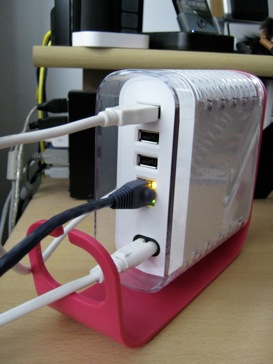
But now I believe I have found a better option in the form of the Pogoplug. This clever little bunch of tricks sits independently of your computer (PC or Mac) by plugging it into your router and then allows you to access up to four USB drives/memory sticks via an internet browser or a native application.

The rather lurid pink Pogoplug is small enough to sit tucked away on the corner of a desk or a shelf, and once set up you can pretty much forget about it. Set-up itself is a breeze. After plugging in at the mains, simply plug the Pogoplug into a spare ethernet port on your route, connect up to four USB drives, switch it on, and register it on the Pogoplug web site. You can also download a free Finder compatible OS X application and free iPhone app from the App Store giving you full access to your drives wherever you are. It really is that easy.
After following the above steps on my iMac, everything looked hunky dory, so I turned my attention to my MacBook Pro where the real test would take place. Sure enough, the USB drive attached to the Pogoplug appeared in it's proper place on the MyPogoplug web site in Safari without any problems. However after downloading the OS X application I was getting an error message as the app tried to connect to the drive - Failed Starting Drive: Exit Code 0. This wasn't what I wanted to see, and after several attempts and a restart, the message kept appearing.
I posted a message on the support forum and was advised to check with Pogoplug tech support. I duly contacted them via email and within a few hours received a response suggesting that my version of MacFuse may be corrupted. I reinstalled MacFuse, ran the application, and everything was fine. I was very impressed with the quality and speed of response, and especially with the result. So (some of you may guess what's coming next...) Pogoplug Technical Support (notably AdamC), get the latest (virtual) Apple Harvest Service Excellence Award.

I've yet to perform any real tests regarding speed of access over the internet - wirelessly connecting across my LAN doesn't really constitute much of a challenge, but I'll provide an update at some time in the future when I've got something useful to report. I the meantime, I can report that the iPhone App works very well, and even allows me to view certain files (PDFs for example) in their natural format on the iPhone. Extremely useful.
As I was writing this review I did find one additional problem... I was repositioning the Pogoplug after taking the photos, and the attached WD Passport drive fell on the floor and required reformatting and re-cloning. So, if you do move the Pogoplug for whatever reason, it's worth un-mounting any attached drives first! But I don't think that problem is unique to the Pogoplug... just to dumb users!!!
Friday, 29 January 2010
Joby Jollies - Update
Towards the end of last year I posted an entry waxing lyrically about the Joby Gorillapod and using it with the iPhone. At that time Joby had announced that their iPhone case, specially designed for use with the Gorillapod would soon be available as a separate item for those who already had a Gorillapod.
True to their word, within a few days the case appeared on their website and I put in my order just before Christmas. I didn't expect the package to arrive until the New Year, but half way through January there was still no sign of it. I contacted Joby through Twitter (@Jobyinc) and they replied to say they would look into it but could I email their service team. This I duly did, and within a few hours received an email explaining that the item had been sent on the day of order, but had apparently got lost in the post and a replacement would be dispatched forthwith.
A couple of days ago the iPhone case arrived and I would definitely recommend it to anyone with an iPhone and Gorillapod (especially if you've also downloaded the Gorillacam app also described in the post).
Whilst the suction pad I had been using worked OK, it did require a very clean surface, and was not suitable for anything too rigorous. The dedicated case provides a much more robust connection to the Gorillapod, and the iPhone simply clips into it with a very snug fit - in fact so snug it can be a bit tricky to get it out in a hurry. The good news is that the case fits flush on a flat surface. The case can be purchased direct from the Joby website and costs £14.95.

It's worth noting that I would not consider this to be a replacement case for an iPhone. It's better than nothing, as it is sturdy enough, but it doesn't provide the depth of protection that I look for in a permanent case.
I'm pleased to award the first Apple Harvest service award of 2010 to Joby (sorry guys, it's a virtual prize), for their swift and effective response.
True to their word, within a few days the case appeared on their website and I put in my order just before Christmas. I didn't expect the package to arrive until the New Year, but half way through January there was still no sign of it. I contacted Joby through Twitter (@Jobyinc) and they replied to say they would look into it but could I email their service team. This I duly did, and within a few hours received an email explaining that the item had been sent on the day of order, but had apparently got lost in the post and a replacement would be dispatched forthwith.
A couple of days ago the iPhone case arrived and I would definitely recommend it to anyone with an iPhone and Gorillapod (especially if you've also downloaded the Gorillacam app also described in the post).
Whilst the suction pad I had been using worked OK, it did require a very clean surface, and was not suitable for anything too rigorous. The dedicated case provides a much more robust connection to the Gorillapod, and the iPhone simply clips into it with a very snug fit - in fact so snug it can be a bit tricky to get it out in a hurry. The good news is that the case fits flush on a flat surface. The case can be purchased direct from the Joby website and costs £14.95.
It's worth noting that I would not consider this to be a replacement case for an iPhone. It's better than nothing, as it is sturdy enough, but it doesn't provide the depth of protection that I look for in a permanent case.
I'm pleased to award the first Apple Harvest service award of 2010 to Joby (sorry guys, it's a virtual prize), for their swift and effective response.
Thursday, 28 January 2010
Back to Reality
After all the excitement of last night's iPad announcement (and thankfully an end to all the speculation and rumour mongering - for now!) it's time to wake up and smell the roses. The real world is still out there and Apple still has an existing product line to support. I see an increasing number of problems being reported in the press, in blogs and on Apple-related forums, that seem to suggest that the famous Apple quality standards may be slipping ever so slightly. An example is the serious issues with the latest 27inch iMacs which have seen numerous shipping delays. It's a fact of life that a business that built its reputation on the combination of innovative, elegant and high quality products cannot afford to let any one of those attributes be compromised. Of course, it may simply be that increased market share, as well as increasing numbers of products just means that there is more exposure of problems.
Traditionally Mac users have been very product aware. They don't just use their computers and software, they explore the systems and their possibilities and they understand the subtleties and nuances that make Macs so powerful. As more people migrate to Apple from traditional PC brands and Microsoft Windows we shouldn't necessarily expect that pioneering spirit to envelope the new breed of user.
So where am I going with all this?
My networking problems, documented in other entries in this blog have re-emerged, and I cannot find a satisfactory solution. However, I now find that I'm far from alone, which in some ways gives me comfort - working on the old adage of a problem shared being a problem halved (or even solved!). None of the suggestions that I've seen and tried have provided more than slight relief, and all of them involve tinkering with esoteric advanced network settings. Since this is a new problem (new in the sense that it didn't exist in my system six months ago) and is repeatable in other people's, differently configured, systems, the logical conclusion is that it is an OS bug that is causing a network failure.
What bothers me is that I never see any Apple presence on the Apple support forums, so we never know whether any of these problems are investigated at Apple HQ. Worse still, there is no way I can see for a normal user to be able to report a bug, other than as a result of a system crash - no crash no bug!
Apple needs to improve its customer facing support service to provide us with some reassurance that our problems are being investigated and that solutions, where applicable, are being sought. I'm on about genuine problems here, not the ones that plague support forums because people are too lazy or stupid to figure things out for themselves by picking up a book or doing a search on the internet.
Reputations built on quality will disintegrate overnight if that quality is compromised. Caveat Apple.
Traditionally Mac users have been very product aware. They don't just use their computers and software, they explore the systems and their possibilities and they understand the subtleties and nuances that make Macs so powerful. As more people migrate to Apple from traditional PC brands and Microsoft Windows we shouldn't necessarily expect that pioneering spirit to envelope the new breed of user.
So where am I going with all this?
My networking problems, documented in other entries in this blog have re-emerged, and I cannot find a satisfactory solution. However, I now find that I'm far from alone, which in some ways gives me comfort - working on the old adage of a problem shared being a problem halved (or even solved!). None of the suggestions that I've seen and tried have provided more than slight relief, and all of them involve tinkering with esoteric advanced network settings. Since this is a new problem (new in the sense that it didn't exist in my system six months ago) and is repeatable in other people's, differently configured, systems, the logical conclusion is that it is an OS bug that is causing a network failure.
What bothers me is that I never see any Apple presence on the Apple support forums, so we never know whether any of these problems are investigated at Apple HQ. Worse still, there is no way I can see for a normal user to be able to report a bug, other than as a result of a system crash - no crash no bug!
Apple needs to improve its customer facing support service to provide us with some reassurance that our problems are being investigated and that solutions, where applicable, are being sought. I'm on about genuine problems here, not the ones that plague support forums because people are too lazy or stupid to figure things out for themselves by picking up a book or doing a search on the internet.
Reputations built on quality will disintegrate overnight if that quality is compromised. Caveat Apple.
Sunday, 8 November 2009
Despair and Joy
A couple of weeks ago we had yet more kit failure at the Apple Harvest. I'd been staying at my girlfriend's house for a couple of days, and had taken my MBP with me as I had some work to do while I was there. It was also a chance to check out some new software I'd purchased - ShareTool - allowing me to access my home office iMac from anywhere in the world via the internet. More on that later...
On the second morning, disaster struck. The MBP had been asleep during the night; an oversight on my part as I wouldn't normally leave a laptop plugged in and turned on. When I went to wake it up there was a blank screen and no light in the Apple logo on the lid. However, a quick check using the iStat app on my iPhone showed that the machine was actually booted and working normally, apart from the rather significant lack of video. More bizarrely, when I tried to screen share from my girlfriend's iMac (yup I've made a convert of her too!), everything was fine and dandy. So the good news was that it wasn't a complete system failure. iStat, by the way, is an essential and cheap diagnostic tool for anyone with an iPhone and Mac hardware.
Some research on the internet into the problem suggested that there were other folk suffering similar problems, some of which were traced back to a faulty graphics chip, and that Apple were offering free fixes, but it was difficult to tell if this was the same problem I was experiencing. Whilst the internet is a great place for getting ideas on how to resolve certain problems, more esoteric issues are much more difficult to track down. I guess it's similar to using witness descriptions of police suspects where no two individuals will provide an identical description of the baddy (unless it's a stitch up!).
Having had a new display fitted earlier in the year, I decided to check with the supplier to see if they could throw any light on the matter and more importantly whether the display was still under warranty. All credit to the guys at the Square Group in Derby who answered my email very promptly. They suggested bringing in the machine for inspection (£56.00) but gave me some hope that it may be a simple fix. The bad news was that the display was now out of warranty, but if it was a display issue there may be some grounds to pursue Apple.
Last week, I finally managed to get into Derby and dropped the machine off. I hadn't realised how much of an extension to my life the MBP had become as I seemed quite bereft without it. I duly paid my £56.00 inspection fee, and anxiously waited for a phone call, which came three days later.
In short, yes, it was bad news: complete logic board failure. My mind started racing, replace the board at horrendous cost, or ditch the MBP and buy a new one - neither really affordable options at the current time. The service manager went on..."but Apple have recognised a problem with that particular model and have provided a replacement free of charge which we have now fitted, and we have decided to refund your inspection fee". Good job it was a phone call otherwise I'd have probably tried to kiss the guy. (I've not had much in the way of good news recently!). Faith is also restored in Apple, as it was beginning to fade quite dramatically.
So I should be able to pick up the machine tomorrow morning, and that not so little void in my life will be filled again. It doesn't quite end there though, as while I was in the shop I asked for a quote for putting a replacement hard drive in the iMac (see blog entry from 28-10-09). I was quoted £56.00 for the inspection fee and the cost of the new drive, which was considerably less than I had anticipated. My only issue is how to get a whopping great 24inch iMac into Derby from where I live using public transport, and not damaging it even further.
Regular readers of this blog will know how much I value good service, so this month's service award goes to the Square Group in both Derby and the service centre in Alfreton. No actual prizes I'm afraid but a bit of free advertising won't go amiss I hope, and I might use the refund to buy a Magic Mouse. Just for the record, I used to use "the other" Apple supplier in Derby, but gave up with them because of their dire customer service.
By the way, ShareTool worked like a dream, and allowed me access not only my iMac but also the NAS device attached to the network, and the USB drives attached. Simple to set up and use, although I had some firewall issues with Integro's NetBarrier X5 which I managed to resolve reasonably quickly through trial and error and probably more luck than judgment. Recommended.
On the second morning, disaster struck. The MBP had been asleep during the night; an oversight on my part as I wouldn't normally leave a laptop plugged in and turned on. When I went to wake it up there was a blank screen and no light in the Apple logo on the lid. However, a quick check using the iStat app on my iPhone showed that the machine was actually booted and working normally, apart from the rather significant lack of video. More bizarrely, when I tried to screen share from my girlfriend's iMac (yup I've made a convert of her too!), everything was fine and dandy. So the good news was that it wasn't a complete system failure. iStat, by the way, is an essential and cheap diagnostic tool for anyone with an iPhone and Mac hardware.
Some research on the internet into the problem suggested that there were other folk suffering similar problems, some of which were traced back to a faulty graphics chip, and that Apple were offering free fixes, but it was difficult to tell if this was the same problem I was experiencing. Whilst the internet is a great place for getting ideas on how to resolve certain problems, more esoteric issues are much more difficult to track down. I guess it's similar to using witness descriptions of police suspects where no two individuals will provide an identical description of the baddy (unless it's a stitch up!).
Having had a new display fitted earlier in the year, I decided to check with the supplier to see if they could throw any light on the matter and more importantly whether the display was still under warranty. All credit to the guys at the Square Group in Derby who answered my email very promptly. They suggested bringing in the machine for inspection (£56.00) but gave me some hope that it may be a simple fix. The bad news was that the display was now out of warranty, but if it was a display issue there may be some grounds to pursue Apple.
Last week, I finally managed to get into Derby and dropped the machine off. I hadn't realised how much of an extension to my life the MBP had become as I seemed quite bereft without it. I duly paid my £56.00 inspection fee, and anxiously waited for a phone call, which came three days later.
In short, yes, it was bad news: complete logic board failure. My mind started racing, replace the board at horrendous cost, or ditch the MBP and buy a new one - neither really affordable options at the current time. The service manager went on..."but Apple have recognised a problem with that particular model and have provided a replacement free of charge which we have now fitted, and we have decided to refund your inspection fee". Good job it was a phone call otherwise I'd have probably tried to kiss the guy. (I've not had much in the way of good news recently!). Faith is also restored in Apple, as it was beginning to fade quite dramatically.
So I should be able to pick up the machine tomorrow morning, and that not so little void in my life will be filled again. It doesn't quite end there though, as while I was in the shop I asked for a quote for putting a replacement hard drive in the iMac (see blog entry from 28-10-09). I was quoted £56.00 for the inspection fee and the cost of the new drive, which was considerably less than I had anticipated. My only issue is how to get a whopping great 24inch iMac into Derby from where I live using public transport, and not damaging it even further.
Regular readers of this blog will know how much I value good service, so this month's service award goes to the Square Group in both Derby and the service centre in Alfreton. No actual prizes I'm afraid but a bit of free advertising won't go amiss I hope, and I might use the refund to buy a Magic Mouse. Just for the record, I used to use "the other" Apple supplier in Derby, but gave up with them because of their dire customer service.
By the way, ShareTool worked like a dream, and allowed me access not only my iMac but also the NAS device attached to the network, and the USB drives attached. Simple to set up and use, although I had some firewall issues with Integro's NetBarrier X5 which I managed to resolve reasonably quickly through trial and error and probably more luck than judgment. Recommended.
Tuesday, 18 August 2009
Great Service Deserves a Mention
Service is an interesting concept to many people in Britain. Whether it be staff in shops, waiters and waitresses in bars and restaurants through to individuals in call centres or receptionists on service desks we almost expect curt responses and bad manners. There always seems to be something else more important to do or some excuse to treat customers with contempt.
When we go abroad, especially to the United States, we often sneer at the service culture we find there. It's as if it is a reflex action to hide our embarrassment at seeing ordinary men and women offer genuine service as a matter of course.
For sure, these are generalisations - not everyone in the UK is guilty, and not everyone in the US is a shining example of service excellence. But I recently made a purchases in the UK and US where this divide was clearly highlighted. In both cases, these were on-line purchases, so there was no face to face contact. In fact in both cases all communication was done by e-mail.
I had ordered my Dell Mini 9 from an on-line store in the UK offering next day delivery. After a few days there was no sign of a delivery, and the order status on the web site had not changed from "ordered". I sent an e-mail to the store, and received a prompt reply saying that they would look into it. After a further four days I had heard nothing else, and so cancelled the order. Almost before I'd pressed the send button, I received notification that the netbook would be delivered the following day. Too little, too late. I still cancelled the order, and took my business elsewhere.
Last week I read an article in MacFormat which mentioned a piece of software to teach yourself to speed read. I placed an order on-line through the US web site, downloaded the software and installed it on my iMac desktop. I then tried to install the software onto my MacBook Pro but was unsuccessful because of an activation problem. At no time did the web site, license agreement or installation process mention any such restriction, so I wrote to the US developer asking if there was any solution.
Within a few minutes I received a reply saying that the developer was out of town (it was a Friday afternoon) but that he would send me a coupon. The following day I received a coupon enabling me to install the software on my laptop. Gratis, free, no charge and no questions asked.
So, to Vince at iVerbum, developers of iSpeedRead, my sincere thanks. I'll post a review of the software on the blog at a later date. In the meantime, let it not be said that us Brits don't recognise excellent service when we encounter it.
As for the UK company, I'm not going to name them in the hope that it was a one off communications breakdown and I'm prepared to give them the benefit of the doubt. But of course, I'll never really know because I won't be using them again.
When we go abroad, especially to the United States, we often sneer at the service culture we find there. It's as if it is a reflex action to hide our embarrassment at seeing ordinary men and women offer genuine service as a matter of course.
For sure, these are generalisations - not everyone in the UK is guilty, and not everyone in the US is a shining example of service excellence. But I recently made a purchases in the UK and US where this divide was clearly highlighted. In both cases, these were on-line purchases, so there was no face to face contact. In fact in both cases all communication was done by e-mail.
I had ordered my Dell Mini 9 from an on-line store in the UK offering next day delivery. After a few days there was no sign of a delivery, and the order status on the web site had not changed from "ordered". I sent an e-mail to the store, and received a prompt reply saying that they would look into it. After a further four days I had heard nothing else, and so cancelled the order. Almost before I'd pressed the send button, I received notification that the netbook would be delivered the following day. Too little, too late. I still cancelled the order, and took my business elsewhere.
Last week I read an article in MacFormat which mentioned a piece of software to teach yourself to speed read. I placed an order on-line through the US web site, downloaded the software and installed it on my iMac desktop. I then tried to install the software onto my MacBook Pro but was unsuccessful because of an activation problem. At no time did the web site, license agreement or installation process mention any such restriction, so I wrote to the US developer asking if there was any solution.
Within a few minutes I received a reply saying that the developer was out of town (it was a Friday afternoon) but that he would send me a coupon. The following day I received a coupon enabling me to install the software on my laptop. Gratis, free, no charge and no questions asked.
So, to Vince at iVerbum, developers of iSpeedRead, my sincere thanks. I'll post a review of the software on the blog at a later date. In the meantime, let it not be said that us Brits don't recognise excellent service when we encounter it.
As for the UK company, I'm not going to name them in the hope that it was a one off communications breakdown and I'm prepared to give them the benefit of the doubt. But of course, I'll never really know because I won't be using them again.
Subscribe to:
Posts (Atom)


 Posts
Posts


