Showing posts with label Thunderbolt. Show all posts

Saturday, 8 December 2018

"It's Simply The Best" - My Honeymoon Period with the 2017 15" MacBook Pro

Two weeks on since I took possession of my new MacBook Pro and I’ve not lost that loving feeling. On the contrary; I’ve become seriously bonded to the machine and I find I miss not working on it so I keep sneaking off to do more work. It’s simply the best.

Before I embarrass myself any further with dubious song references and suggestions of deviant man-machine behaviour, let me run through the new Apple Harvest configuration. For the record, this is Apple Harvest HQ at my fiancee’s house. I’m back in the UK after nearly four years of living in Prague and last year Mel and I got engaged (in Prague, on her birthday!). I set up a temporary AH HQ here back in 2013, and now we’re settling down to domestic bliss, it’s back up and running.

To be honest, not a great deal has changed. The old 2011 MBA got replaced with a 2015 MBA which has now been replaced by the 2017 MBP. As I indicated in my last post, this is a refurbished 2017 Space Grey 15inch model. It’s the quad-core "Kaby Lake" i7 2.9GHz version, with 16Gb of RAM, 512Gb SSD, with Radeon Pro 560/4Mb and Intel HD 630 1.5Mb. At the time of writing, I’ve just updated the OS to Mojave 10.14.2.

Initially, the laptop was connected to my old Belkin Thunderbolt Hub, but at the weekend I swapped this out with an OWC Thunderbolt 2 dock that was idling away at my house (which I never got around to writing about, but it’s a great piece of kit). This was a good idea for various reasons:-

  • It’s at least twice the speed of the Belkin, which didn’t  quite meet the original TB speed potential because of design constraints
  • It has an HDMI port which the Belkin doesn’t and this frees up a TB2 port for a TB2 external hard drive
  • There are two additional USB-A 3.0 ports making 5 in total as well as a FireWire 800 port
12 port OWC Thunderbolt 2 Dock

All in all, it’s a much tidier set up, and it means I’m only using two of the ports on the laptop - one to connect to the hub (using an Apple Thunderbolt 2 to 3 adapter) and one for the power (more on that in a moment).

I’ll admit, the idea of a laptop furnished with only Thunderbolt 3/USB-C connectors made me a little bit nervous. But in reality, I’m not really sure I understand what all the fuss is about. I miss the SD card slot that proved so useful on the MBA with only 256 Gb of onboard storage but having twice that storage capacity on the MBP made it slightly redundant. I was using it to keep all my Apple Mail files on, and a used a thumbnail flash drive for my photo library - all of these now live on the SSD - a much better arrangement.

I appreciate that when I’m on the road things will be a little different, but I have that covered. I purchased a set of 3 USB-C to USB-A 3.0 adapters, a 7-in-1 USB-C dongle which includes Gb Ethernet, SD card, micro SD card, headphone, HDMI and 2 USB-A 3.0 ports and a USB-C extension lead for a little over £40. Job done! For reference, this was the ATZEBE which I managed to get on an Amazon Lightning deal for £27.19 down from £35.99. So far, I’ve only used the SD card slot, but that worked perfectly well. The USB-C/USB-A adaptors were £5.91 for a packet of three.
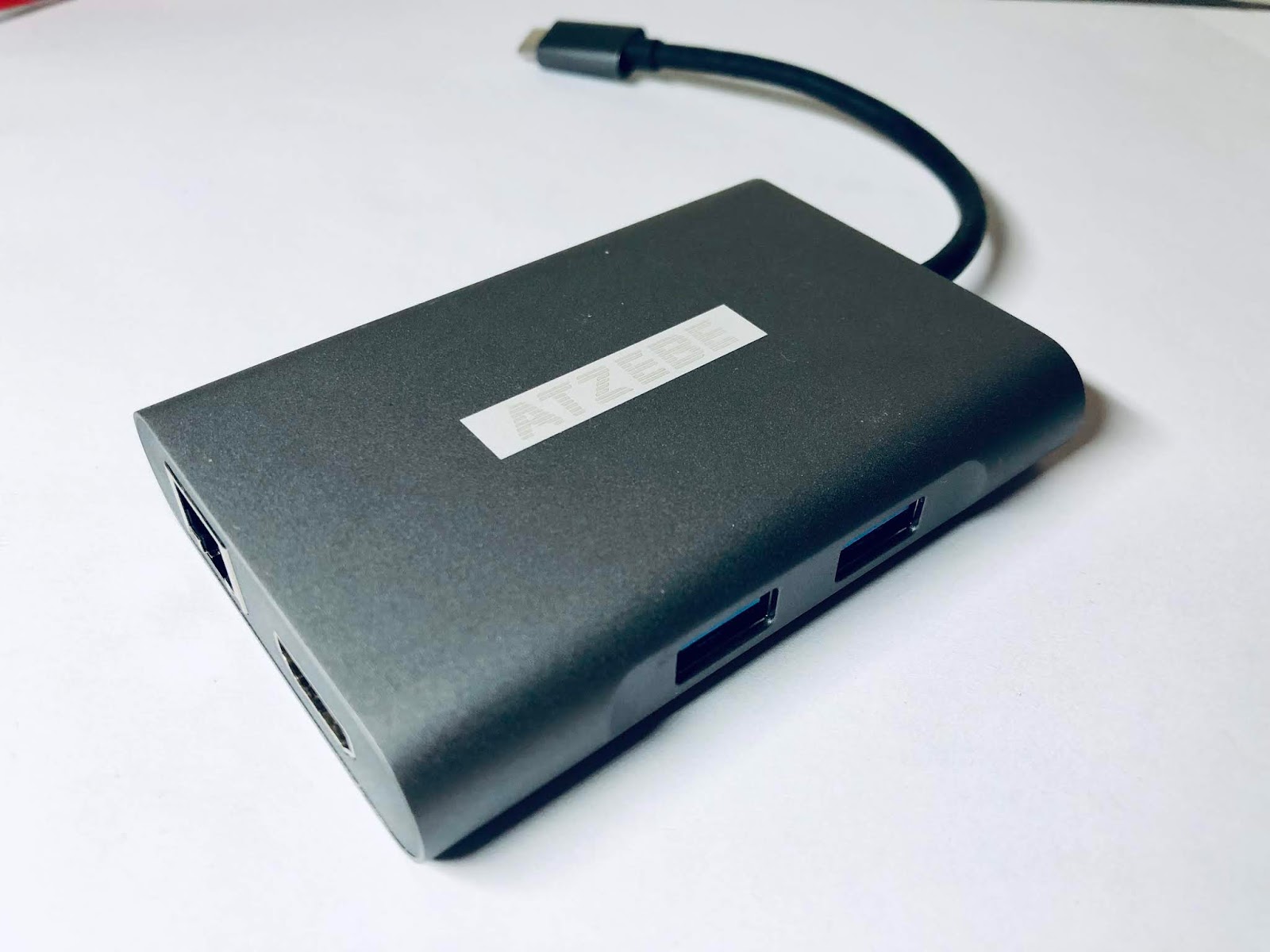
ATZEBE 7-in-1 USB-C dongle
Since Apple, in their less-than-infinite wisdom, decided to do away with the MagSafe power connector I decided to go with a third party USB-C option which is ideal. I got a First2savv Magnetic USB Charging Cable which is rated at 87W/4.3A which means it’s perfectly capable of charging the MBP at full speed and does it in about 90 minutes. To emphasise that it’s a charging cable I got it in bright red! It’s currently selling for £11.99 on Amazon, but I got mine for under a tenner.

USB-C Magsafe type connector from First2savv
No doubt the arguments about cables and adaptors will continue for the next couple of years - don’t they always? The thing is, it’s a fact of life that technology changes. Apple is often an early adopter and if you haven’t got used to that by now then you’re in the wrong ecosystem. Quite frankly, if I’m going to be carrying the extra pound of weight of a 15inch MBP compared to a 13inch MBA, I’m not likely to complain about an extra few ounces of additional dongles!

In my last post, I hinted that my initial purchase of the same spec'd MBP from eBay was about to go to arbitration. It did, and I got a full refund without any issues. Happy days!





Thursday, 25 June 2015

Fruity Picks #6 - Kanex Thunderbolt Adapter (USB 3/Ethernet)

When I'm at Apple Harvest HQ my 2011 MacBook Air is usually connected to a Thunderbolt hub. For a long time it's been the Belkin Thunderbolt Express Dock (original model) which I reviewed in July 2013. I've now moved this to my partner's house for when I'm taking refuge with her and I've set up the new OWC Thunderbolt 2 dock at HQ.

When I'm on the road, especially abroad, it isn't convenient to transport a full blown hub around especially with the power bricks they generally require, but I still want to harness USB 3.0 and Ethernet capabilities normally provided by the hub.

The Kanex KTU20 Thunderbolt adapter is an ideal compromise to solve the problem. This little black box plugs into the Thunderbolt slot on the MacBook Air and adds a USB 3.0 port and a Gigabit Ethernet port to enhance the MBA capabilities. The adapter is about 5x8x2 cm and weighs just 91g.


It's not a particularly cheap solution - it'll set you back about £75 - but it is compact and it doesn't require any additional power cables. I used it most recently on my 7 month stay in Prague where I used it to connect to the apartment's router and the HGST Touro Desk Pro 4Tb USB 3 hard drive I took with me. By combining this with a 7 port USB hub I had access to all my USB requirements (albeit running at USB 2 speeds but none of these devices were performance critical).

The Kanex KTU20 will stay packed my travel bag - it's ideal for short trips involving hotel stopovers. It's just a shame it doesn't have Thunderbolt pass-through capability...but now I'm just being greedy!


Tuesday, 9 July 2013

Review : Belkin Thunderbolt Express Dock


I'm at Apple Harvest HQ enjoying the second day of my sabbatical in the glorious sunshine. I finished my last contract on Independence Day and I'm now taking a few months off to focus on all the things I want to do, rather than all the things I have previously had to do. One of which is to write, both on the Apple Harvest blog and my Process Management blog but also to get stuck into the two management books I started writing a while ago, but have never had the time and space to complete.

We've had a couple of significant deliveries here recently. Just this morning we took possession of the Mobee Magic Feet accessory charger, but more on that in the next post. The really exciting upgrade to HQ is that the 2011 MacBook Air is now attached to a Belkin Thunderbolt Express dock to max out its performance potential.

It seems that the Belkin Thunderbolt dock has been around forever without being available. It was first showcased back in September 2011, and has finally started shipping in the UK. During that time it has been through several design incarnations, several different technical specifications, and at one stage looked like it had been scrapped completely.

But the hub had finally arrived and it certainly looks the part now. It also ticks all the right boxes in terms of its technical performance - at least as far as this user is concerned. The hub provides USB 3.0 (x3), Firewire 800 (x1), Gigabyte Ethernet (x1) and pass through Thunderbolt (x1) ports, as well as audio in and out sockets. All this comes wrapped up in a little metal box which is about the size of 2 stacked DVD boxes. The hub comes with the necessary external 12W power supply - a brick about the same size as a normal laptop power adaptor.

All this comes at a price - I got mine for about £250 directly from Belkin UK and Apple on-line are selling for the same price - but it's a lot cheaper than shelling out £900 on an Apple Thunderbolt display, which still doesn't support USB 3.0 and is also considerably less portable! Caveat emptor - no Thunderbolt cable is included so be prepared to spend an additional £30-35 for that essential item.

The Thunderbolt Express hub is not an essential requirement at Apple Harvest HQ. However by connecting it with the MBA I effectively get two high performance work stations, with the new iMac in the office and the MBA/Thunderbolt hub combo in the living room. I've been able to resurrect my Moshi self powered hub (see 2011 - the Late Post) which uses a combination of  Firewire and USB to power a hub with 4 USB 2.0 and 2 Firewire ports without needing external power. I also get the 2 original MBA USB ports back and I no longer need a Thunderbolt or USB Ethernet connection.

Belkin Thunderbolt Express Dock (bottom)


On the subject of internet connections, I'm getting a download speed of about 77Mbps with an upload speed of 11Mbps with my Virgin cable 120Mbps connection. This is a bit slower than the upstairs office speed but as I mentioned last time, the MBA connection is going through powerline network boxes. There is a slight hit on the USB 3.0 speed as the Belkin implementation of USB 3.0 puts a cap of 2.5Gbps against the (theoretical) 5.0Gbps standard. Nevertheless - it's still faster than USB 2.0 and one of the few ways to get USB 3.0 capability on a pre-2012 MBA.

The Belkin isn't the only Thunderbolt dock available - the Matrox DS1 is cheaper but offers less. The dock looks good, runs silently and doesn't generate much heat. For me the Belkin Thunderbolt Express hub was easily the most cost effective way to seriously hike up the performance of the MBA and will extend its workhorse life by several years. I'm hoping not to have to spend huge chunks of my life on the road in the future, but the hub is portable enough to be taken abroad for an extended stay if necessary.

If you're in a similar position and want to max out an MBA (or any other Thunderbolt compatible Mac for that matter) I'd seriously consider thinking about this as a viable option.