Showing posts with label MacBook Pro. Show all posts

Sunday, 27 March 2022

Apple Silicon - Round 2: Choosing a new laptop

A few weeks ago I wrote about my pre-empted first foray into using Apple Silicon. After eight months of using the M1 Mac mini (16Gb / 512Tb) as my primary machine, I am well and truly hooked. I hinted that I was going to swap out my 2017 15” MPB for a new M1 laptop and I have now made good on that decision. But before I spill the beans on what I eventually purchased I want to reflect on the decision making process.


Apple Harvest Prague office set-up


I’ve been using Macs since 2007 when I was finally driven out of the Windows stable. I was working in Oslo in Norway, and my personal laptop at the time was an ASUS R1F, one of the first machines that doubled as a laptop and tablet. The computer itself was fine and I really liked using it, but it was the time of Windows Vista and at one stage it seemed that every time I switched the computer on I had an hour’s worth of updates to deal with before I could do any work. 


I made the switch to a 15” MacBook Pro just after the release of OS X Leopard and have never looked back (that machine still boots up and works perfectly well!). Since then I’ve owned a couple of iMacs, a couple of MacBook Airs in addition to the current kit. I think carefully about every machine I buy. I think about my specific use case and do my research to align my purchases to my needs. Like most people, I set a budget to work with, although I’m fortunate enough that, as my own boss, I can be flexible within reason.


Since the newest 14 and 16 inch M1 laptops were announced I’ve seen countless questions from people asking complete strangers for advice on what to buy. For every question, I’ve seen dozens of useless answers and incorrect comments. I’ve come to the conclusion that no one does any real work anymore. Everyone who uses a MacBook seems to be doing professional video editing for a living and therefore need to buy the highest specification laptop regardless of how sensible that may be. Despite the numerous vloggers and tech reviewers reporting how even the basic M1 MBA, Mac mini and 13” MBP make video editing a relative breeze, the recommendations still come in to buy 16” M1 Max MBP with 32Gb of RAM and 2Tb SSDs regardless of how “over the top” this is for many people. 


I suspect that anyone recommending a minimum of 32Gb of memory still doesn’t understand that unified memory works in a different way to memory in an Intel architecture. I also suspect that most people who claim to be doing professional video editing perhaps make a few adjustments to their 30 second iPhone videos taken in the pub on a Saturday night and push them out on TikTok when they’ve sobered up sometime on Sunday afternoon. But mostly I suspect that many of the people recommending these high-level machines to everyone and his dog, don’t actually possess one, but make people think they do, by posing as an ‘authority’ on the subject. Basically, amongst the Facebook classes, buying a Mac has become something of a pissing contest! It reminds me of my slightly eccentric late uncle who used to buy top range HiFi equipment and then buy crappy 99p cover compilation albums from Woolworths!


Anyhow, this was my use case:


1. I’m potentially leaving Prague for good this year so I wanted to move the Mac mini and 2017 MBP back to the UK and get a single M1x laptop


2. The laptop will normally be used as a desktop, and there are already Thunderbolt 3 and other hubs in place so no need for lots of extra ports, and there is a Dell 24” monitor in place to act as the primary display


3. When the laptop does get used as a laptop I want it to be small, light and usable on aeroplane and train tables. I already have a variety of multi-port dongles


4. The specification only needs to be as good as the M1 Mac mini, since the work I’m doing will be the same - although a larger SSD might not be a bad thing as my photos library continues to grow and I’d prefer it not to live on an external drive


5. I’d still like the Touch Bar because I do use it and will continue to use it and maybe will use it even more than I currently do


6. The delivery date needed to be before 12th March at the very latest to align with my travel plans


When I looked at the best options I really have three choices - an M1 MBA, an M1 MBP 13” or the 14” MBP M1 Pro. I know I don’t need the power or ports on the 14” although it does provide a better display. The MBA doesn’t have the ToolBar, so by default I opted for the 13” MBP, but I decided to go for the 1Tb SSD option.


Fate has a habit of disrupting plans, however. I finally made my decision whilst in the airport waiting for my flight back to the UK. The Mac mini was in my hold baggage and I’d adjusted my office set-up in Prague to accommodate a new laptop. The delivery date for my option was the next day, so it would be in Derby sometime on Saturday. 


By the time I arrived home and was ready to submit the order, the delivery date for all non-standard builds from Apple was in three weeks' time - a week after my return to Prague. Checking around, the story was the same everywhere - no one could deliver the 1Tb option before the 12th March - my drop-dead deadline. Eventually, I found a supplier who could deliver by the 8th March but only the 2TB option so I decided to go with this rather than face having to take the Mac mini back to Prague. It’s more than I intended to spend but sometimes you have to take what’s on offer. And before you start telling me that for £200 more I could have got a 14” MBP with a 2Tb drive, those weren’t shipping until even later in March. Other folks may be thinking that I should have waited until the Apple Peek Performance event but let’s face it, there’s no guarantee of what may be revealed at that session or when these models may be shipped. 


The nature of the computer/tech business is such that every piece of kit is liable to be superseded within days of us purchasing it. We just need to accept that inevitability and teach ourselves that buyer’s remorse is equally futile. I know that when my new laptop arrives, I shall have addressed my needs for now and the next few years. 


UPDATE: Since I first drafted this piece, the new laptop has arrived and is all set up and running perfectly. In the end, it didn’t arrive as expected but a day later - it took DPD 24 hours to ship the box from their Birmingham depot to the one in Leicester (about 40miles up the road!). I’ve had stuff arrive from Shanghai in less time! And since the rumours of the M2 13” MPB were completely scotched at the event I feel totally vindicated in my decision.


Wednesday, 16 January 2019

Czeching out the i-tec Thunderbolt 3 Docking Station

If you’re going to buy a shiny new MacBook Pro you really should have the right supporting kit to go with it. After all, you wouldn’t buy a Ferrari and then never take it out of first gear, would you? Fast toys need to be paired with fast supporting tools! (NB - I would never recommend that anyone buys a Ferrari if they need an estate car, and the same mantra applies for computer peripherals; get the right tool for the job!)

Initially, I had my refurbished 2017 MBP linked up to an old Thunderbolt 1 Belkin Hub. A few weeks later I swapped out the Belkin for my OWC Thunderbolt 2 docking station which was a significant improvement. Since then I’ve been looking lustily at TB 3 docks, but they don’t come cheap.

The top contenders I was checking out were the CalDigit TS3, StarTech TB3, OWC 12 or 14 port docks, Elgato TB3 and the latest Belkin 3 dock. I had some quite specific criteria in mind:
  • SD Card slot (1)
  • HDMI slot (2)
  • Gigabit Ethernet
  • 3+ USB-A ports
  • 2+ TB3 ports
  • Less than £250 pounds
(1) I have SD card reader dongles but I wanted this feature built into the dock
(2) I only need two screens and the laptop is one of them. 4K and 5K video options are not important to me at present

This whittled out the Belkin and Elgato (no SD slot and too expensive), the CalDigit (DisplayPort rather than HDMI and too expensive), the StarTech (no SD slot or HDMI) and left the OWC docks neither of which met the price point I was looking for. I was resigned to staying with the current OWC TB2 dock and waiting for the prices to drop when I came across a new contender, the i-tec TB3HDMIDOCK.

i-tec is a Czech based company with a range of docking stations and adapters in their catalogue. I bought their USB 3.0 Dual docking station a few years ago when I needed to switch between my MBA and a Windows laptop that I’d been supplied with from a contract I was working on. This was well built and completely reliable and was great value for money compared to the competition.

In fact, i-tec had two TB3 docks listed the TB3HDMIDOCK and the TB3HDMIDOCKPLUS. The only difference was the PLUS model supports 85W charging compared to 60W charging for the standard model. And the PLUS model on Amazon UK was £25 more expensive. In the end, I found the standard version of the dock for less than £200 including delivery from a company called tekshop247. I put the order in on Thursday evening and it arrived by post on Saturday morning!

It took all of 30 minutes to unbox and install the new dock and most of that was clambering around under my desk to swap over the power bricks for the i-tec and OWC docks. Swapping over the attached devices was almost as easy. Ethernet, HDMI, 4TB USB-A hard disk and USB-A hub were straight swaps. My Lacie USB-C 5TB drive is now attached to the dock whereas it used to be connected directly to the MBP. A 1TB Buffalo Thunderbolt disk which I use as an additional Time Machine disk is now connected via the Apple TB2/TB3 adaptor to the MBP.
The rear side view of the i-tec Thunderbolt 3 dock

Strictly speaking, since the MacBook Pro is generally plugged into the mains these days I could use the dock to power the laptop directly, but I’m still using the original power supply with the First2savvv magnetic connector I mentioned previously.

Finally my Harmon-Kardon Soundstick II wired speakers plug into the front 3.5mm headphone jack on the front of the dock. This is the only thing I don’t like. I’d prefer the socket to be at the side or at the back rather than in the front. I can see why it’s positioned where it is for headphone users but it’s an aesthetic anomaly for me. This just leaves two spare front-facing USB-A slots and the SD card slot which was so important for me.

There is no software installation required, and even the ethernet connection worked first time without me having to cajole it into operation as I usually do. I did learn the valuable lesson that in order for externally powered peripherals to work properly, they have to be connected to the mains. I did forget that last step, which explained why the two front LEDs didn’t glow as I expected once all the bits were plugged in. The left hand LED glows green when power is supplied, and the right-hand side glows blue when Thunderbolt devices are connected.

The front view of the dock in situ (yes the monitor stand needs a dusting!)

The overall footprint of the i-tec dock is really quite small, measuring 229mm across, 87mm deep and 27mm tall. It can only be used in a horizontal orientation. I have mine raised off the desktop with a couple of wooden blocks which allows air to circulate and keeps the unit running relatively cool - it isn’t at all uncomfortable to put my hand firmly on the top even though it has been running 24x7 for the last four days!

Apple Harvest HQ 2019

Ironically, of all the docks I've looked at (and this also goes for dongles), all the manufacturers are backwards-looking and supplying USB-A slots rather than USB-C. In some respects, I would have prefered to have a dock with five or more TB3/USB-C slots and bought another bunch of adapters to deal with legacy USB-A devices. No doubt this will change in time, and at least this dock can support up to 5 daisy-chained TB3/USB-C devices.

In hindsight, perhaps I should have paid the extra £20 and bought the higher-rated charging version, but to be honest I'm not really bothered (and I never thought to look on the tekshop247 website!). At home, the laptop spends so little time on the battery that the charging is not an issue, and whilst the dock is quite small, the same cannot be said about the power brick, so it's probably not going to be going far in the future! The other point is that although I'm not bothered about 4K or 5K video at present, this dock does support both so it's relatively future proof should my needs change.

This is a really compact little dock that offers great value for money. The build quality is as good as that on the old OWC. If you're in the market for a budget TB3 dock, look no further.


UPDATE 2022-02-01: I now have both the 60 and 85W models - the higher powered one in Prague with me and the older one is back in the UK. Both continue to perform brilliantly!


Tuesday, 1 January 2019

Technology Would Work Perfectly If It Wasn't For End-Users!

As we start another new year, I’ve been intrigued by a few discussions I’ve been party to during recent days. One was about upgrading to Mojave (macOS 10.14) and the other was about a smart home system that is very popular in the UK called Hive. The conversations were quite different yet they shared some key similitudes. Both indicated that there are large numbers of people who make key decisions about technical matters by casually surfing the internet and reading negative comments, primarily on social media.

In the two specific discussions I’m referring to, both on Facebook, the original posters were inclined to ignore the good advice and being swayed by both ill-informed suggestions or by completely misinformed statements.


By the end of 2019, it will have been thirty years since I first touched a computer. Strictly speaking, it wasn’t even a computer; it was a dumb terminal attached to a mainframe system in a different part of the city. Since that October day, I’ve witnessed staggering changes in the IT industry which I have ended up spending my life in.

The biggest difference, of course, is that back then, computers were anything but the consumer units that they have become today. The MBP that I’m writing this on is many orders of magnitude more powerful than the old ICL1900 I first used. In those days, before the infinite wisdom of the public was harnessed into the ultimate truth of today’s internet, if you had a problem you had to figure out a solution yourself. And so it has been for most of my working life. In general, you had to programme your way out of problems. Even today, many teething computer problems can be overcome with a bit of imagination and a couple of useful tools. Luckily, some of the smart people who write some of these tools are also generous enough to hang out on the internet and provide amazing advice to those of us who are prepared to do a bit of work and actually think about a problem rather than just expecting someone else to fix it for us.

Whenever you get a new Mac (or upgrade to a new OS) there are often a few things that don’t work quite the way they did. In an ideal world, you’d have the wherewithal to dig down and find out the root cause of the problem and fix it. Sadly, most of us don’t have that luxury these days. I recently found that my new MBP had a minor problem when it auto-switches from  Light to Dark modes (using NightOwl). For some reason, this switch forces a Finder restart and this, in turn, means that TotalFinder terminates. My solution was to use Keyboard Maestro to build a macro so that whenever Finder restarts, TotalFinder will automatically restart as well. It’s a seamless action and I don’t have to do anything.

My point is, that with a bit of imagination and a few readily available tools we can get over niggling problems with fairly simple workarounds. Sure, it took me a couple of hours to isolate the problem, research potential fixes and eventually create my own but was that a good enough reason not to upgrade to Mojave and solve a whole bunch of other problems. Clearly not. But many people out there seem to be looking for excuses not to do things which are pretty much common sense. And they are aided and abetted by others who are determined to make things worse - like the guy who stated that Mojave will not run 32-bit apps. Funny, that, because my version does!

After reading about the person who decided that they had read so much bad press about Hive in a Facebook Hive and Nest forum that they were going to go with a completely different system, I was reminded about the recent reviews I read on Amazon about products I have purchased and found worked perfectly. Although technology has become more prevalent in our homes and daily lives, the majority of people still don’t have any idea about how it works, how to install it correctly, or how to use it correctly. In many cases, they don’t even know why they’ve bought it. “I’ve just bought an Apple Watch - what does it do?”….

So it’s easy for people to buy something, plug it in and then sit back and complain that it doesn’t work rather than actually take the trouble to do it properly. Much of our technology is still emergent - it doesn’t always work exactly as it should, but for many people, it does for most of the time. They just don’t tell the rest of us, because they are quite happy getting on and using the time they’ve saved to do something interesting rather than whine and criticise things they simply don’t understand!

Are problems with Apple kit on the increase? Probably not. But there are now 100,000,000 Mac users all of whom have access to the internet and many of whom are all too ready to bad mouth the technology when it doesn’t work the way they expect. So problems become exaggerated and other people believe the negative hype.

For the record, I have Hive installed in my house and recently we installed it in my fiancee's house. 99% of the time it works perfectly, and I’d be happy to recommend it to a prospective buyer.

For many years I’ve held the belief that if end-users didn’t exist there wouldn’t be any issues with technology. That’s never truer than now!

Happy New Year!


Saturday, 8 December 2018

"It's Simply The Best" - My Honeymoon Period with the 2017 15" MacBook Pro

Two weeks on since I took possession of my new MacBook Pro and I’ve not lost that loving feeling. On the contrary; I’ve become seriously bonded to the machine and I find I miss not working on it so I keep sneaking off to do more work. It’s simply the best.

Before I embarrass myself any further with dubious song references and suggestions of deviant man-machine behaviour, let me run through the new Apple Harvest configuration. For the record, this is Apple Harvest HQ at my fiancee’s house. I’m back in the UK after nearly four years of living in Prague and last year Mel and I got engaged (in Prague, on her birthday!). I set up a temporary AH HQ here back in 2013, and now we’re settling down to domestic bliss, it’s back up and running.

To be honest, not a great deal has changed. The old 2011 MBA got replaced with a 2015 MBA which has now been replaced by the 2017 MBP. As I indicated in my last post, this is a refurbished 2017 Space Grey 15inch model. It’s the quad-core "Kaby Lake" i7 2.9GHz version, with 16Gb of RAM, 512Gb SSD, with Radeon Pro 560/4Mb and Intel HD 630 1.5Mb. At the time of writing, I’ve just updated the OS to Mojave 10.14.2.

Initially, the laptop was connected to my old Belkin Thunderbolt Hub, but at the weekend I swapped this out with an OWC Thunderbolt 2 dock that was idling away at my house (which I never got around to writing about, but it’s a great piece of kit). This was a good idea for various reasons:-

  • It’s at least twice the speed of the Belkin, which didn’t  quite meet the original TB speed potential because of design constraints
  • It has an HDMI port which the Belkin doesn’t and this frees up a TB2 port for a TB2 external hard drive
  • There are two additional USB-A 3.0 ports making 5 in total as well as a FireWire 800 port
12 port OWC Thunderbolt 2 Dock

All in all, it’s a much tidier set up, and it means I’m only using two of the ports on the laptop - one to connect to the hub (using an Apple Thunderbolt 2 to 3 adapter) and one for the power (more on that in a moment).

I’ll admit, the idea of a laptop furnished with only Thunderbolt 3/USB-C connectors made me a little bit nervous. But in reality, I’m not really sure I understand what all the fuss is about. I miss the SD card slot that proved so useful on the MBA with only 256 Gb of onboard storage but having twice that storage capacity on the MBP made it slightly redundant. I was using it to keep all my Apple Mail files on, and a used a thumbnail flash drive for my photo library - all of these now live on the SSD - a much better arrangement.

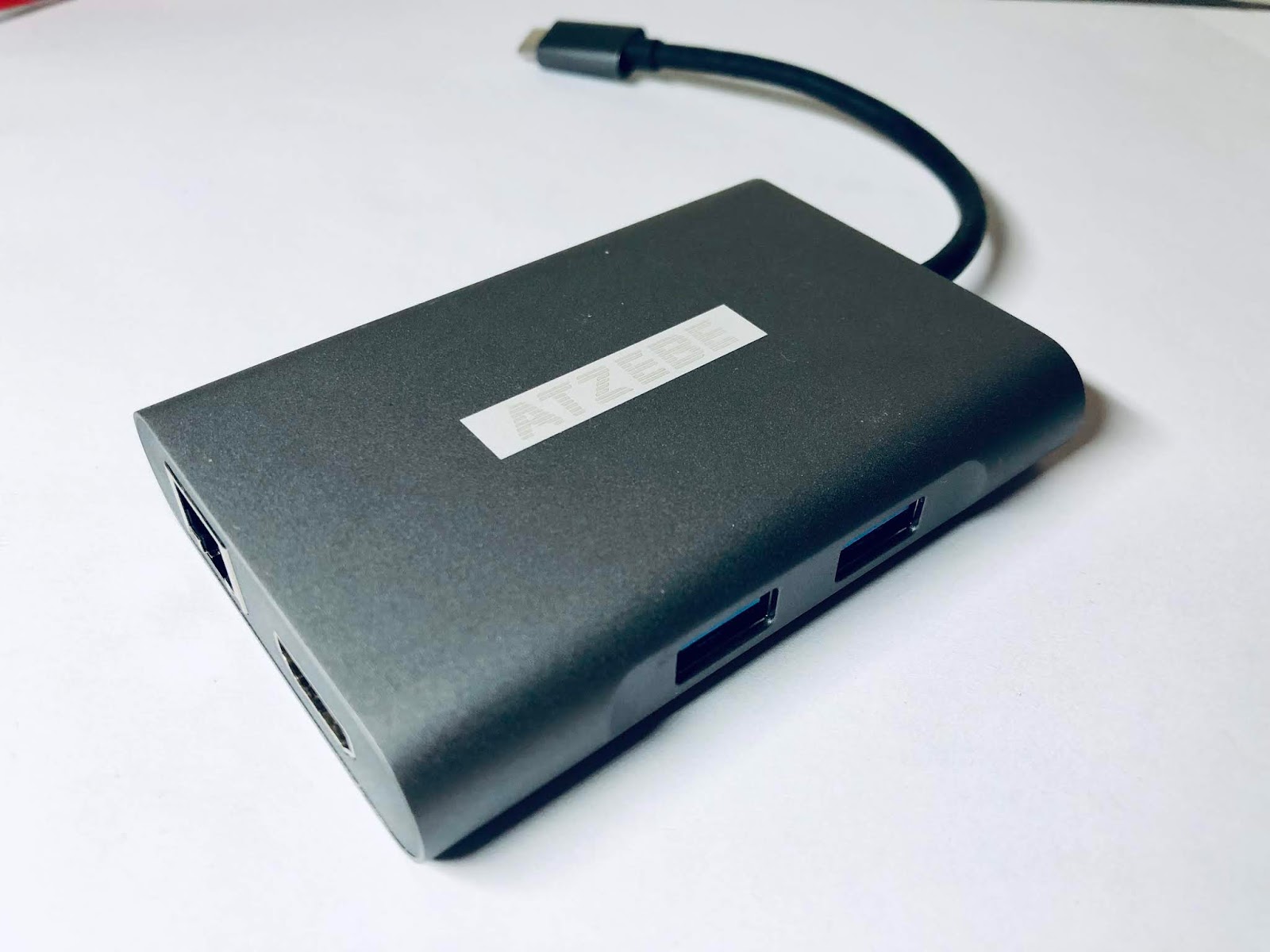
I appreciate that when I’m on the road things will be a little different, but I have that covered. I purchased a set of 3 USB-C to USB-A 3.0 adapters, a 7-in-1 USB-C dongle which includes Gb Ethernet, SD card, micro SD card, headphone, HDMI and 2 USB-A 3.0 ports and a USB-C extension lead for a little over £40. Job done! For reference, this was the ATZEBE which I managed to get on an Amazon Lightning deal for £27.19 down from £35.99. So far, I’ve only used the SD card slot, but that worked perfectly well. The USB-C/USB-A adaptors were £5.91 for a packet of three.

ATZEBE 7-in-1 USB-C dongle
Since Apple, in their less-than-infinite wisdom, decided to do away with the MagSafe power connector I decided to go with a third party USB-C option which is ideal. I got a First2savv Magnetic USB Charging Cable which is rated at 87W/4.3A which means it’s perfectly capable of charging the MBP at full speed and does it in about 90 minutes. To emphasise that it’s a charging cable I got it in bright red! It’s currently selling for £11.99 on Amazon, but I got mine for under a tenner.

USB-C Magsafe type connector from First2savv
No doubt the arguments about cables and adaptors will continue for the next couple of years - don’t they always? The thing is, it’s a fact of life that technology changes. Apple is often an early adopter and if you haven’t got used to that by now then you’re in the wrong ecosystem. Quite frankly, if I’m going to be carrying the extra pound of weight of a 15inch MBP compared to a 13inch MBA, I’m not likely to complain about an extra few ounces of additional dongles!

In my last post, I hinted that my initial purchase of the same spec'd MBP from eBay was about to go to arbitration. It did, and I got a full refund without any issues. Happy days!


Thursday, 29 November 2018

I Just Got My Apple (MacBook) Mojo Back

I can’t believe it’s two years since I last posted on this blog. Wow! It’s not even as though there’s been nothing to write about. In fact, that’s been the problem. There has simply been too much to write about but unfortunately for readers here, most of what I have been writing has been on other topics in other blogs.

So why now, you may ask. Well, quite simply, I just got my Apple mojo back. You remember that feeling you had when you bought your first mainstream Apple product - with me it was my 2007 MacBook Pro with Leopard (OS X 10.5). I just got that same feeling for the first time in years. After eight years of being a MacBook Air devotee, I have gone back to my MBP roots and splashed out on a 2017 15” MacBook Pro.

Which is quite simply, a thing of absolute beauty! And it goes like the clappers!

2017 MacBook Pro 15" i7 2.90 512Gb/16Gb (Space Grey)
I love the MBA - I wrote about my first one back in August 2011 and its replacement in December 2015. But recently I faced a similar situation to what I encountered in 2015. My needs have outgrown the capability of the MBA; specifically the limited 8Gb memory, the restriction of the 256Gb onboard SSD and the slow Thunderbolt 2 bus. Even a year ago this wasn’t too much of an issue, but these days I find myself spending too much time looking at spinning beach balls and listening to the fans thrashing furiously. A year ago, I was really using the MBA as a mobile device - playing music, processing photos and some office work. Now, I’m more desk-bound. I’m still doing all the above, along with web development, a lot more writing and office work and more intensive photographic editing.

I half-heartedly started looking for a replacement machine about two months ago and was torn between the new MBA or a 13in MBP. With a minimum specification of 16 and 512 Gb of RAM and SSD space, this started to push the price up towards crazy money which I couldn’t justify. So I started looking at the refurb market and plumped on an Apple refurbed 2017 13in MBP before I checked out the eBay market and found a new 15in 2017 MBP for a similar price. In the heat of the moment I bought it - and that deal will soon be going to eBay for arbitration; I’ve still not received the laptop after three weeks and the seller is not responding. Caveat emptor!

Having rashly gone out and bought a bunch of accessories designed to fit a 15in MBP I was kind of stuck in that direction, but luckily found a refurb from a reputable outfit that was only £150 more expensive than the no-show.

The new box came via DPD within 24 hours and my Apple mojo was packaged with it. It took a day to set up - one of the most painless transfers I’ve ever done and it is performing flawlessly.

The MPB is connected to my old Thunderbolt 1 Belkin hub which isn’t the fastest box in the world, but I can’t afford a TB 3 replacement just yet. But it works. My photos and mail are now back on the internal SSD having been off-loaded onto external flash drives previously, and that helps speed things up considerably, although obviously with the trade-off of using up space on the SSD.

Apple Harvest HQ - November 2018
Of course, it's early days, and I've not yet tried using the laptop as a laptop as it's been tethered to my desk while I iron out any migration issues. The keyboard which has caused a fair amount of controversy remains untested, and the much-vaunted toolbar (by Apple) is just a little too far out of reach to have had any major use. (Personally, I'm looking forward to playing with the toolbar in earnest).

Next time, I'll have a look at some of the other changes that have impacted Apple Harvest HQ in the last couple of years.


Translate by a professional
No Internet Connection