I'm pleased to report that my Pogoplug is still going strong (unlike some of the disks I've attached to it - they really don't like being thrown around do they?). It had it's stiffest test last weekend when I stayed over at my girlfriend's house and I turned off my iMac at home, relying solely on the Pogoplug and a cloned copy of the iMac hard drive, with access through my MacBook Pro laptop.
Now that the OS X Pogoplug application is working properly on the MBP I was fairly confident that everything would work fine and dandily, and sure enough I booted up the MBP and with the Pogoplug application set up to open automatically I was reassured to see the shared disks appear on the desktop, clearly identified by their shocking pink icons. I clicked on the WD Passport drive I had earlier cloned from the iMac boot drive, and there in Finder was exactly what I expected to see, namely a full working copy of my iMac startup disk. I started to click down through to my User folder - it took ages...In fact it took so long that I figured that something was very wrong so I quit the application and fired up Safari.
I've bookmarked my My Pogoplug:View web site which is the page where your personal Pogoplug configuration can be accessed so I went straight to it. Everything looked fine - the disk was mounted and visible. I started clicking down through the folders as I had with the OS X application, and everything worked fine. There was a slight time lapse, but I was on a wireless connection and my girlfriend's broadband is not the zippiest in the world so I wasn't unduly worried.
Knowing that the connections at both ends were sound, I retried the Pogoplug application. This time I was much more successful - the disks mounted, and I was able to navigate around my remote disk without any problems. Again the slight time delay was present, but it wasn't abnormal, and certainly didn't prevent me from working.
I'm not sure what caused the initial glitch on the application side, but I haven't been able to repeat it.
So, at last I have a working solution to my remote access problem. I'd still be happier to have the iMac fully functional and without the ever present network problems that more and more people seem to be reporting. But I'm pleased that this solution is also a bit cheaper and greener by not having the iMac powered up for long periods in my absence.
Pogoplug - you're a star - in fact you get five stars !
Showing posts with label Pogoplug. Show all posts
Showing posts with label Pogoplug. Show all posts
Thursday, 13 May 2010


Thursday, 6 May 2010
Review in Brief: Pogoplug
There's a very good chance that I'm going to spending some time working in continental Europe before too long. Somehow I always manage to get postings to the more expensive and remote parts of Europe. I spent six months in Oslo a few years ago, and now it looks like Zurich in Switzerland is on my itinerary. I only mention this because one of the problems with being away is that I often find that I need to access files on my desktop. Of course there are alternatives:
- I could clone my desktop drive and carry that around with me, but that requires carting another piece of kit around, and demands the discipline of maintaining the contents
- I could use ShareTool and connect remotely with the iMac from my laptop via the internet. This is my preferred option, but while my network problems persist this would fail on the first occasion that I lose my connection. It also means that the iMac is powered up24x7 for as long as I'm away. Not very green...
But now I believe I have found a better option in the form of the Pogoplug. This clever little bunch of tricks sits independently of your computer (PC or Mac) by plugging it into your router and then allows you to access up to four USB drives/memory sticks via an internet browser or a native application.

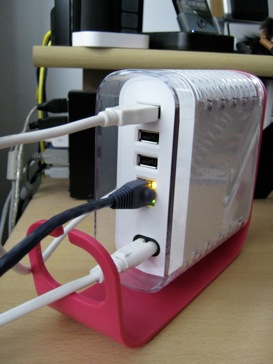
The rather lurid pink Pogoplug is small enough to sit tucked away on the corner of a desk or a shelf, and once set up you can pretty much forget about it. Set-up itself is a breeze. After plugging in at the mains, simply plug the Pogoplug into a spare ethernet port on your route, connect up to four USB drives, switch it on, and register it on the Pogoplug web site. You can also download a free Finder compatible OS X application and free iPhone app from the App Store giving you full access to your drives wherever you are. It really is that easy.
After following the above steps on my iMac, everything looked hunky dory, so I turned my attention to my MacBook Pro where the real test would take place. Sure enough, the USB drive attached to the Pogoplug appeared in it's proper place on the MyPogoplug web site in Safari without any problems. However after downloading the OS X application I was getting an error message as the app tried to connect to the drive - Failed Starting Drive: Exit Code 0. This wasn't what I wanted to see, and after several attempts and a restart, the message kept appearing.
I posted a message on the support forum and was advised to check with Pogoplug tech support. I duly contacted them via email and within a few hours received a response suggesting that my version of MacFuse may be corrupted. I reinstalled MacFuse, ran the application, and everything was fine. I was very impressed with the quality and speed of response, and especially with the result. So (some of you may guess what's coming next...) Pogoplug Technical Support (notably AdamC), get the latest (virtual) Apple Harvest Service Excellence Award.

I've yet to perform any real tests regarding speed of access over the internet - wirelessly connecting across my LAN doesn't really constitute much of a challenge, but I'll provide an update at some time in the future when I've got something useful to report. I the meantime, I can report that the iPhone App works very well, and even allows me to view certain files (PDFs for example) in their natural format on the iPhone. Extremely useful.
As I was writing this review I did find one additional problem... I was repositioning the Pogoplug after taking the photos, and the attached WD Passport drive fell on the floor and required reformatting and re-cloning. So, if you do move the Pogoplug for whatever reason, it's worth un-mounting any attached drives first! But I don't think that problem is unique to the Pogoplug... just to dumb users!!!
Subscribe to:
Posts (Atom)


 Posts
Posts


