Showing posts with label Magic Mouse. Show all posts

Tuesday, 1 February 2011

Two New Toys - a sneak preview

I've been a bit under the weather for the past week or so - it's virus season in the UK (that's the kind that attacks people, not Apples) and it was just a matter of time before it caught up with me. But two new toys arrived at Apple Harvest HQ this morning which cheered me up no end. The first was a blooming great big box which turned out to be my long awaited iPad dock. The second was the new wireless charger for the Magic Mouse.

This is just going to be a sneak preview as they are so new and still need to be put through their paces. Watch out for more in-depth reviews in future posts.

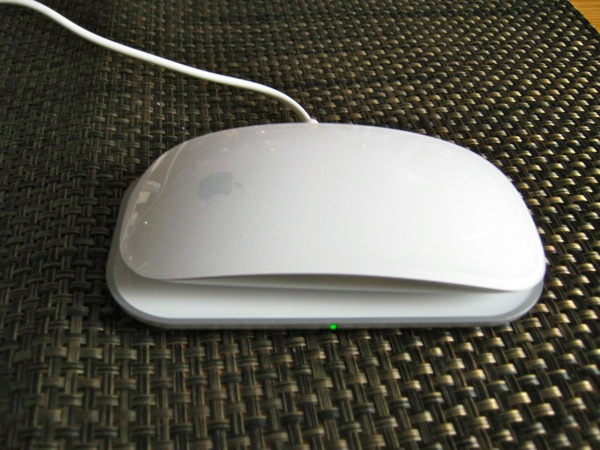
Mobee Magic Charger

I'll start with the charger because it is so simple to get up and running. The Magic Charger consists of an inductive charging pad, a replacement battery pack and a mini USB cable. Installation is simply a matter of taking the back off the Magic Mouse, removing the batteries and replacing them with the battery pack. With the USB cable plugged into the charging pad and an appropriate USB power source (USB port on a Mac or an external charging unit both work fine) all that is left to do is to put the mouse on the pad and watch the little green light start to flash.

That's all folks!

Mobee Magic Charger
Mobee Magic Charger

This is a really neat piece of gadgetry, which Mobee claim will pay for itself within six months of office use or a year in the home. I can't be bothered to do the sums but that sounds fine to me. What I really like is the fact that I don't have to worry about running out of mouse batteries again - well at least not Magic Mouse batteries. Of course, you are potentially losing a precious USB port while charging is taking place, but ideally you can charge overnight and during breaks when the USB port is less valuable. I have a Mophie Juice Pack Powerstation which I can use as an external charger if necessary.

It took about an hour to get the Magic Mouse charged to a state where it claimed to be at 50%. I've seen claims that the % charge never rises above 78% but as I was writing this I checked and it was now at 82%, but I'm not convinced about the accuracy of Apple's battery life algorithms any more. I'll be watching these numbers over the next few days and report back in a later post. Similarly the manufacturer claims 6 days autonomy after a full charge, but the Macworld review suggests a day is more realistic. Again, I'll monitor and give you my findings in a week or so.

iHome iA100 Bluetooth Audio System

I've used an iHome audio dock for a while (see my review of the iHome Reson8 from October 2009), and have been really pleased with. But of course, it doesn't work with the iPad, and companies appear to have been very slow to fill this apparent gap in the market. iHome announced their iPad offering back in July 2010, and it started appearing in October. I ordered mine back in October and it finally arrived this morning. And it's been well worth the wait.
The unit is much smaller than I expected, but is beautifully engineered and looks fantastic. It sounds really good too. And critically for me - you don't have to take the iPad out of its case. The iA100 is an app-enhanced device and can be set up to work in conjunction with the iHome+Sleep app which is free from the App Store.

That's all I'm going to say for now - the alarms are set up for the next few days and if they work as I expect, I'll start writing the proper review tomorrow!
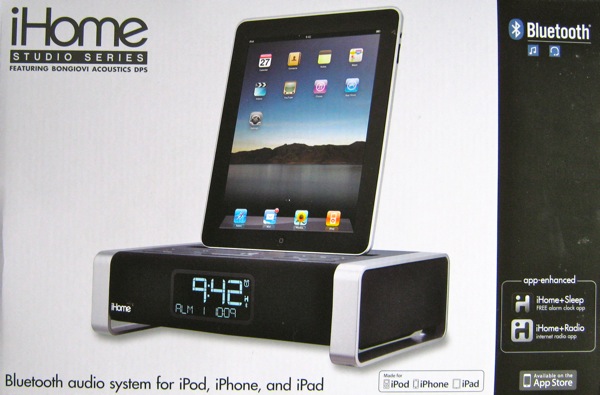
iHome iA100 Bluetooth Audio System
iHome iA100 Bluetooth Audio System (in the box)

Sunday, 15 August 2010

Apple Magic Trackpad - Simply the Best

Despite having subscriptions to all the UK Mac magazines, access to all the gossip and rumour mongers on Twitter and other internet sites, and tuning in to the live coverage of the most recent WWDC, the first I heard of the Apple Magic Trackpad was when it appeared in the Apple Store website a couple of weeks ago. I honestly wasn't sure quite what to make of it initially. I think my first reaction was "what the ... is this, and why does it cost £59.00?".

So I went round to my local Apple Store (one benefit of living in one of the most expensive capital cities in the world is that I have an Apple Store on the doorstep) and bought one. It was a bit of a "comfort" buy to be honest. Women buy shoes, nerds buy gadgets and everyone buys chocolate when they feel a bit sorry for themselves (I actually bought shoes and chocolate as well, but for different reasons).

After two weeks of use I have now dispensed with the Magic Mouse completely and even carry the Magic Trackpad around with me. But more about that later...

The Magic Trackpad is a near 5 inch square of Mac standard metallic finish which connects to your Mac via Bluetooth. The catch is that you must be using Snow Leopard 10.6.4 and you need to download an additional supporting piece of software from Apple to make it work. In fact, it seemed to work in a limited capacity right out of the box, but there was very limited functionality. Once the software update had downloaded and installed, a whole new rafter of functionality was available. There have been some reports of problems with the installation, but I found everything worked smoothly without any issues.

The trackpad performs all the functions currently available on the most recently multi-gesture trackpads across the MacBook range. My own MBP is a 2007 model and doesn't have this capability so this is a way of accessing it. Clearly the iMac and MacPro ranges have no trackpad at all, and while these are probably the target machines for the trackpad, it works brilliantly with the laptop as well.

The "glass" surface is very similar to the Magic Mouse surface - very smooth and cool to the touch, and forgiving of even the sweatiest fingers. It is possible to track very accurately with the pad as it has very fine precision. The big difference between this and the Magic Mouse is that the trackpad doesn't run out of room! While I think the Magic Mouse is the best mouse I've ever used, I do get frustrated with it occasionally when it fails to respond properly to my instructions. So far the only similar problem I've had with the Trackpad is that it can be too responsive, but I think I may still need to tweak some of the sensitivity settings.

The Apple software installs into the System Preferences and is fine as it stands, but to really take advantage of the Magic Trackpad you really need to install one of the third party applications available for the Magic Mouse. I use BetterTouchTool which is much more configurable and allows me to set up gesture recognition for many more things. I have set up Tap to Click for everyday use as it seems more natural than to use the slightly stiff physical click of the Trackpad, although this works fine on a hard surface like a desk. Two finger scrolling through web pages is also very natural, and I find that I'm able to use different fingers for the same gestures which is less onerous on the index digit in particular. With BetterTouchTool I have gestures set up to access the Dashboard, Spaces, Expose, System Preferences and I can even put the laptop to Sleep with a five finger click.

Because it is so light, even with the two AA batteries installed the Magic Trackpad is easy to slip into my work bag and the design allows me to keep it upright next to the laptop. It's actually easier to carry around than a mouse. Since installing the Magic Trackpad my Magic Mouse has been consigned to the cupboard. To be honest, there are one or two things that are probably easier with a mouse - multiple item selection being the most notable - but I think that may be because I've been doing them for such a long time with a mouse. I'm not sure that I'm ready to lose the mouse completely, but the trackpad has really become an integral part of my computing activity.

Battery life is pretty good too. After two weeks of constant use the battery level is down to 86% - far better than the Magic Mouse.

The worst thing is that I occasionally find myself reaching out for the MacBook Pro trackpad by mistake, and since it's an older model (late 2007) far from being a smooth tracking experience, it feels like I'm running my fingers over a cat's tongue.

Check out the Trackpad. You won't regret it, and you may well reconsider the way you work with your current input device.

The biggest surprise of all for me was that the Magic Trackpad was about £10 cheaper in Zurich than in the UK. In fact all Apple prices are lower than in the UK. So I can stock up on some extra chocolate!
.

Wednesday, 17 February 2010

A Kind of Magic

With my birthday coming up in a couple of weeks I decided to hedge my birthday funds and finally splash out on a Magic Mouse. The decision was mainly brought about because I found a supplier whose price couldn't be matched and they had some in stock. Over the years I've spent a small fortune on computer rodents; I've found some that I love, and others which have disappeared behind the electronic skirting board in a few weeks for one reason or another. I'm a difficult person when it comes to mice because I'm both left handed and have quite small hands. So my criteria for a good mouse are:

  • Small and lightweight

  • Uncontoured - in other words they fit into both hands the same way

  • Featured - scroll device, multiple buttons, etc.

  • Configurable

  • Truly Wireless - no dongle/receiver
Since I bought my first Apple computer I've used the Mighty Mouse (oops, that's the Apple Mouse isn't it!!), both wired and wireless versions and I must be one of the few people on the planet who have never experienced the well documented problems with the scroll ball. My only real hang-up with the Apple Mouse is the side buttons, which are just too stiff to be comfortable. I like the feel of the Apple Mouse in my hand, but the wireless version may be just a tad too heavy with the batteries in. In fact the only other mouse I use these days is the Kensington SlimBlade Trackball Mouse which I tend to use with my Hackintosh or when I'm on the train with my MBP. I love its ability to swap between mouse and trackball functions especially in cramped conditions.

I'm now hooked on the Magic Mouse. I like the low profile, although I fail to understand how people with long finger nails can use it without the desktop acting like a nail file, and it feels lighter than the wireless Apple Mouse. I love the silky touch of the mouse top and even slightly sweaty fingers seem to glide over its surface. But what really swings it for me is the 3rd party software available for it to make it truly configurable.

So far I've tried MagicPrefs, MouseWizard and jiTouch, but I keep coming back to BetterTouchTool. All four programmes offer similar features, but BTT just has the edge for me, primarily because it provides so much configurability, including fine control over speeds, touch pressures, surface boundaries, in addition to a wide range of gestures, taps, clicks and swipes. Regardless of which programme you finally opt for just take care not to overwhelm yourself by setting up loads of defined gestures; start off with a couple and build on these as you get more familiar with the mouse.

It does take some time to get to grips with the Magic Mouse. Fingers need to be in quite precise positions for a specific gesture to initiate the appropriate response and sometimes it can take to or three attempts. Scrolling is much smoother than with the Apple Mouse but clicks and taps can be a bit frustrating until you've been using the mouse for a while. I do find that my hand gets a little bit tired after prolonged usage and I think this is partly because of the low profile, but it may simply be bad habits on my part from not taking proper breaks. Time will tell.

Other caveats - the instructions indicate that to use a Magic Mouse on different machines requires you to unpair from one before pairing with another. In reality two machines can share a single Magic Mouse, but you clearly need to disconnect from one before connecting to the second. I've not noticed any issues regarding battery life as yet, with 84% charge remaining after 7 days. I certainly haven't seen the draining effect on my wireless keyboard that some users have reported, although that may be because I have one of the old plastic wireless keyboards.

Can I recommend the Magic Mouse? I really think you need to try one out before you decide to buy one. It's not going to suit everyone, and if you don't like it, it's an expensive mistake. If you decide to go ahead, be patient, and try out the different software options to get the best balance to suit you. Personally, I'm going to get a second one at some stage so I don't have to carry the current one around with me when switching between machines.